Oracle Database Architecture
Complete Technical Guide | January 11, 2026
Oracle Database architecture is a sophisticated system comprising memory structures, background processes, and physical storage components that work together to provide high performance, reliability, and data integrity. This guide provides an in-depth exploration of Oracle’s architectural components and their interactions.
Table of Contents
1. Architecture Overview
2. Oracle Instance vs Database
3. Memory Architecture
4. Background Processes
5. Physical Storage Structures
6. Logical Storage Structures
7. Data Flow and Processing
8. RAC Architecture
1. Architecture Overview
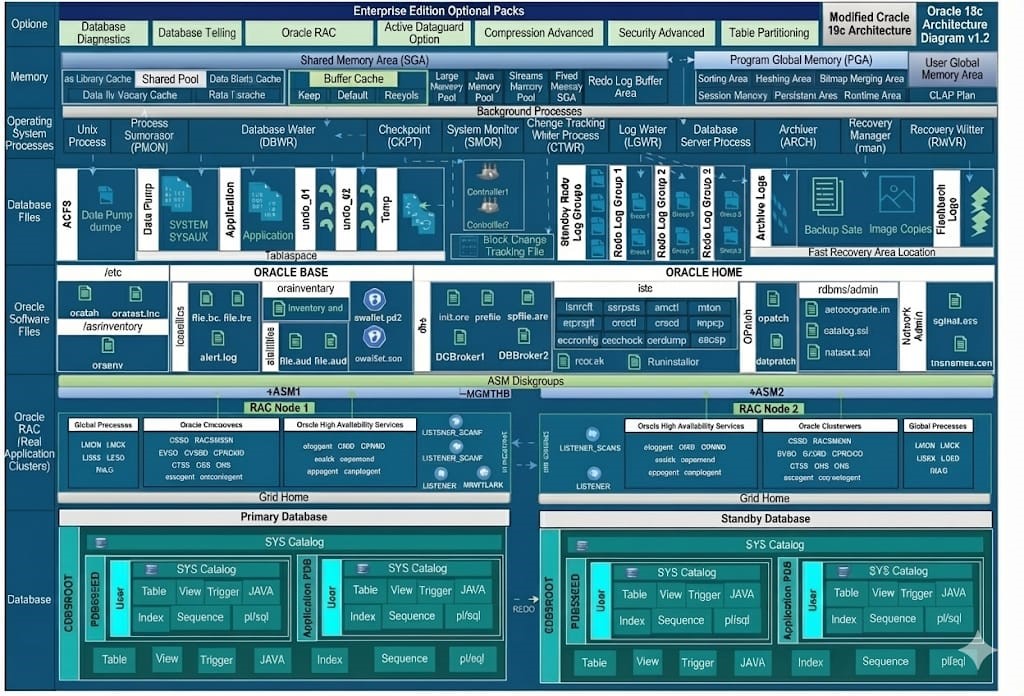
Oracle Database employs a multi-layered architecture designed for enterprise-grade performance, scalability, and fault tolerance. The architecture separates the database instance (memory and processes) from the database itself (physical files), enabling flexible deployment options including single-instance, RAC, and Data Guard configurations.
Figure 1: Oracle Database Architecture – High-Level Overview
Key Architectural Principle The separation of instance and database enables Oracle’s high availability features. An instance can be started, stopped, or failed over independently while the database files remain persistent on storage.
2. Oracle Instance vs Database
An Oracle instance consists of memory structures and background processes that manage database operations. The instance exists in server memory and is transient – it is created when the database starts and destroyed when it shuts down.
Component | Type | Description |
System Global Area (SGA) | Memory | Shared memory region containing data and control information |
Program Global Area (PGA) | Memory | Private memory region for each server process |
Background Processes | Process | Mandatory and optional processes performing database operations |
Oracle Database
The database consists of physical files stored on disk that contain the actual data, metadata, and transaction logs. These files persist across instance restarts and contain:
- Data Files: Store actual user and system data in tablespaces
- Control Files: Contain database metadata and structural information
- Redo Log Files: Record all changes made to the database
- Archive Log Files: Historical copies of redo logs for recovery
- Parameter Files: Instance configuration parameters (SPFILE/PFILE)
-- View instance status and database information
SELECT instance_name, status, database_status
FROM v$instance;
SELECT name, open_mode, database_role
FROM v$database;
3. Memory Architecture
System Global Area (SGA)
The SGA is a shared memory region that contains data and control information for the Oracle instance. All server processes and background processes share access to the SGA.Database Buffer Cache
Caches data blocks read from data files. The buffer cache uses an LRU (Least Recently Used) algorithm to manage blocks, keeping frequently accessed data in memory to minimize physical I/O.
-- View instance status and database information
SELECT instance_name, status, database_status
FROM v$instance;
SELECT name, open_mode, database_role
FROM v$database;
SELECT name, ROUND(bytes/1024/1024, 2)
size_mb
FROM v$sgainfo

WHERE name LIKE '%Buffer%';
Contains the library cache (parsed SQL statements and execution plans), data dictionary cache, and other shared structures. Proper sizing prevents hard parsing overhead.
SELECT pool, name, bytes/1024/1024 mb
FROM v$sgastat
WHERE pool = 'shared pool'
ORDER BY bytes DESC
FETCH FIRST 10 ROWS ONLY;

Redo Log Buffer
A circular buffer that caches redo entries before they are written to the online redo log files. LGWR flushes this buffer under specific conditions to ensure durability.
Large Pool
Optional memory area used for large memory allocations including RMAN backup/restore operations, shared server session memory, and parallel query operations.
SGA Component | Purpose | Sizing Parameter |
Buffer Cache | Data block caching | DB_CACHE_SIZE |
Shared Pool | SQL/PLSQL caching, dictionary | SHARED_POOL_SIZE |
Redo Log Buffer | Redo entry caching | LOG_BUFFER |
Large Pool | Large allocations (RMAN, parallel) | LARGE_POOL_SIZE |
Java Pool | Java stored procedures | JAVA_POOL_SIZE |
Streams Pool | Oracle Streams/GoldenGate | STREAMS_POOL_SIZE |
-- View SGA component sizes
SELECT component, current_size/1024/1024 current_mb,
        min_size/1024/1024 min_mb,
        max_size/1024/1024 max_mb
FROM v$sga_dynamic_components
WHERE current_size > 0;
Program Global Area (PGA)
The PGA is a private memory region containing data and control information for each server process. Unlike the SGA, PGA memory is not shared between processes.
- Sort Area: Memory for sort operations (ORDER BY, GROUP BY, DISTINCT)
- Hash Area: Memory for hash joins and hash aggregations
- Session Memory: Session-specific variables and cursors
- Private SQL Area: Bind variable values and runtime state
-- View PGA memory usage
SELECT name, value/1024/1024 mb
FROM v$pgastat
WHERE name IN ('aggregate PGA target parameter',
                 'aggregate PGA auto target',
                 'total PGA allocated',
                 'total PGA used for auto workareas');
4. Background Processes
Oracle background processes perform maintenance tasks, I/O operations, and ensure database consistency. Some processes are mandatory while others start based on configuration.
Mandatory Background Processes
| Process | Name | Function |
| DBWn | Database Writer | Writes modified buffers from buffer cache to data files |
| LGWR | Log Writer | Writes redo log buffer entries to online redo log files |
| CKPT | Checkpoint | Updates control files and data file headers at checkpoints |
| SMON | System Monitor | Instance recovery, coalescing free space, cleaning temp segments |
| PMON | Process Monitor | Cleans up failed user processes, releases locks and resources |
| RECO | Recoverer | Resolves distributed transaction failures |
Optional Background Processes
| Process | Name | When Started |
| ARCn | Archiver | ARCHIVELOG mode enabled |
| MMON | Manageability Monitor | AWR snapshots and alerts |
| MMAN | Memory Manager | Automatic memory management enabled |
| CJQ0 | Job Queue Coordinator | DBMS_SCHEDULER jobs exist |
| SMCO | Space Management Coordinator | Automatic space management |
-- View active background processes
SELECT pname, description
FROM v$process
WHERE pname IS NOT NULL
ORDER BY pname;
5. Physical Storage Structures
Data Files
Data files contain the actual database data including tables, indexes, and other segments. Each data file belongs to exactly one tablespace and stores data in Oracle blocks.
-- View data files and their tablespaces
SELECT tablespace_name, file_name,
        ROUND(bytes/1024/1024/1024, 2) size_gb,
        autoextensible, status
FROM dba_data_files
ORDER BY tablespace_name;
Control Files
Control files are critical metadata files containing database structure information, checkpoint data, and RMAN backup metadata. Oracle recommends multiplexing control files across different storage locations.-- View control file locations SELECT name, status, block_size, file_size_blks FROM v$controlfile;
Redo Log Files
Online redo logs record all changes made to the database. Oracle uses a circular writing mechanism with multiple redo log groups for high availability.
-- View redo log groups and members
SELECT a.group#, a.status, a.bytes/1024/1024 size_mb,
        b.member
FROM v$log a, v$logfile b
WHERE a.group# = b.group#
ORDER BY a.group#;
Archive Log Files
When the database operates in ARCHIVELOG mode, filled redo logs are copied to archive destinations before being overwritten. Archive logs are essential for point-in-time recovery.-- Check archive mode and destination
SELECT log_mode FROM v$database;
SELECT dest_name, status, destination
FROM v$archive_dest WHERE status = 'VALID';
6. Logical Storage Structures
Oracle uses a hierarchical logical storage structure that maps to physical storage through tablespaces and data files.
Storage Hierarchy
Level | Structure | Description |
1 | Tablespace | Logical container grouping related segments |
2 | Segment | Database object storage (table, index, etc.) |
3 | Extent | Contiguous allocation unit of data blocks |
4 | Data Block | Smallest I/O unit (typically 8KB) |
Tablespaces
Tablespaces provide logical separation of data and simplify administration. Oracle includes several default tablespaces:
- SYSTEM: Data dictionary and system objects
- SYSAUX: Auxiliary system objects (AWR, Streams, etc.)
- USERS: Default permanent tablespace for users
- TEMP: Temporary segments for sort operations
- UNDO: Undo segments for transaction rollback and read consistency
-- View tablespace usage
SELECT tablespace_name,
        ROUND(used_space * 8192/1024/1024/1024, 2) used_gb,
        ROUND(tablespace_size * 8192/1024/1024/1024, 2) total_gb,
        ROUND(used_percent, 2) pct_used
FROM dba_tablespace_usage_metrics
ORDER BY used_percent DESC;
Data Blocks
The Oracle data block is the smallest unit of I/O. A standard block size is 8KB, though multiple block sizes can be configured. Each block contains:
- Block Header: Block address, segment type, ITL entries
- Table Directory: Information about tables in the block
- Row Directory: Pointers to row locations
- Free Space: Available space for inserts and updates
- Row Data: Actual table rows
7. Data Flow and Processing
Query Processing Flow
1. Parse: SQL syntax check, semantic analysis, optimization
2. Bind: Substitute bind variable values
3. Execute: Read blocks from buffer cache or disk
4. Fetch: Return result rows to client
DML Processing Flow
1. Parse: SQL validation and optimization
2. Execute: Generate undo and redo, modify blocks in buffer cache
3. Commit: LGWR writes redo to disk, transaction completes
-- View SQL execution statistics
SELECT sql_id, executions, buffer_gets, disk_reads,
        ROUND(buffer_gets/executions, 2) gets_per_exec
FROM v$sql
WHERE executions > 100
ORDER BY buffer_gets DESC
FETCH FIRST 20 ROWS ONLY;
8. RAC Architecture
Oracle Real Application Clusters (RAC) extends the single-instance architecture by allowing multiple instances to access the same database simultaneously. RAC provides high availability and horizontal scalability.RAC Components
Component | Purpose |
Global Cache Service (GCS) | Coordinates buffer cache across instances |
Global Enqueue Service (GES) | Manages cluster-wide locks and resources |
Cache Fusion | Transfers blocks between instances via interconnect |
Cluster Synchronization Services (CSS) | Node membership and cluster heartbeat |
-- View RAC instance information
SELECT inst_id, instance_name, host_name, status
FROM gv$instance
ORDER BY inst_id;

-- Check interconnect performance
SELECT inst_id, name, value
FROM gv$sysstat
WHERE name LIKE 'gc%'
ORDER BY inst_id, name;
RAC Best Practice Ensure low-latency, high-bandwidth interconnect between RAC nodes. The private interconnect carries Cache Fusion traffic and is critical for RAC performance. Use dedicated networks and consider RDMA-capable interconnects for large clusters.
Summary
Oracle Database architecture is designed for enterprise workloads requiring high performance, reliability, and scalability. Key takeaways:
- The separation of instance (memory/processes) and database (files) enables flexible deployment and high availability configurations
- Proper SGA and PGA sizing is critical for performance – use Automatic Memory Management or carefully tune individual components
- Background processes handle essential operations – monitor their performance through wait events and system statistics
- Physical storage structures (data files, redo logs, control files) require careful planning for performance and recoverability
- Logical storage hierarchy provides flexible data organization and management capabilities
- RAC extends the architecture for clustering, requiring attention to interconnect performance and global cache efficiency