
Rest Integration
- Integration
Integration means connecting ServiceNow with another application (like Workday, Jira, SAP, or any external system) so they can send and receive data automatically.
Example:
- Workday sends employee data → ServiceNow creates/updates users
- ServiceNow sends incident data → Another system processes it
2 . REST Integration:
REST (Representational State Transfer) is a way for systems to communicate over the internet using HTTP methods like GET (read), POST (create), PUT (update), and DELETE (delete).
2.1 Type Of Rest Integration:
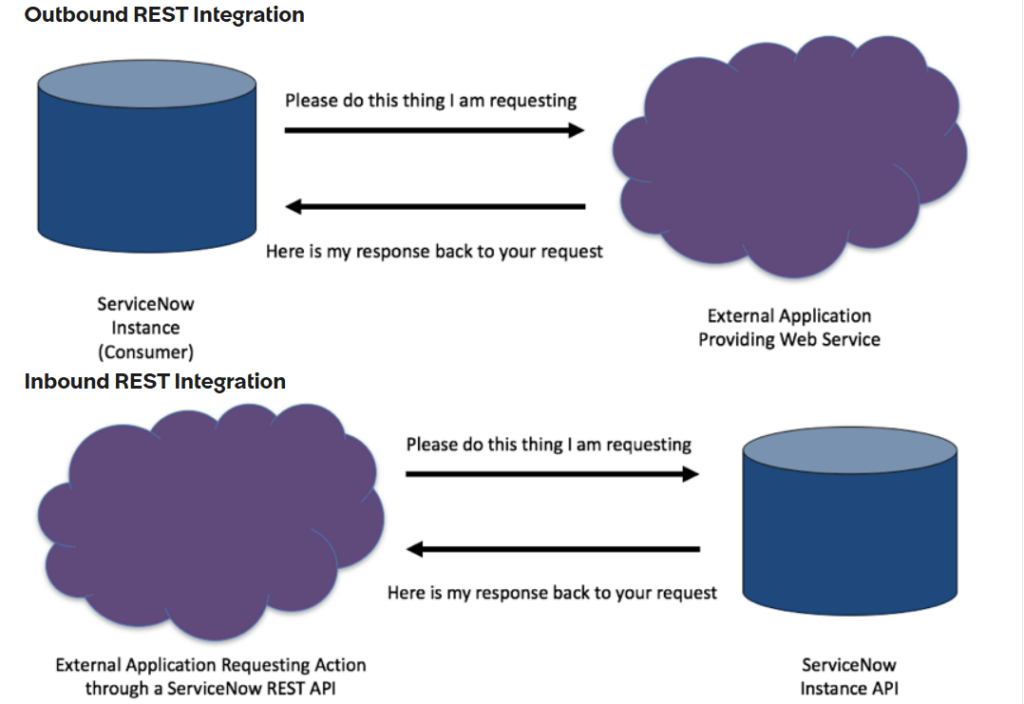
- Inbound REST Integration: External tools (like another app or ServiceNow instance) send data to your ServiceNow instance (e.g., create an incident).
- Outbound REST Integration : Your ServiceNow instance sends data to external tools (e.g., notify another system about a new incident).
- 3.Whatis REST API?
Representational state transfer or REST is the most popular approach of building APIs. When a request for data is sent to a REST API, it’s usually done through hypertext transfer protocol (HTTP). Once a request is received, APIs designed for REST can return messages in a variety of formats: HTML, XML, plain text, and JSON.
A request is made up of four things:
- The Endpoint
- The method
- The headers
- The body
3.1 The Endpoint
The endpoint is the url you request for. It generally consists of a base path and resource path. E.g.
https://dev124645.service-now.com/api/now/table/incident
Every web service provider will have the API documentation, and that needs to be referenced in order to configure the HTTP method endpoint.
3.2 The Methods
HTTP methods define the action to take for a resource, such as retrieving information or updating a record. The available HTTP Methods are:
3.2.1. POST: Create
The POST method is used to submit the information to the server.
3.2.2. GET: Read
The GET method is the most common of all the request methods. It is used to fetch the desired resource from the server.
3.2.3. PUT: Update
Both PUT and PATCH are used to modify the resources on the server with a slight difference. PUT is a method of modifying resources where the client sends data that updates the entire resource.
3.2.3. PATCH: Update
PATCH is a method of modifying resources where the client sends partial data that is to be updated without modifying the entire data.
3.2.4. DELETE: Delete
The DELETE method is used to delete the resource identified by the request url.
3.2.5. Difference Between PUT and PATCH
Feature
PUT
PATCH
Primary Goal
Replace the entire resource.
Update specific fields (partial update).
Payload
Requires the complete record.
Requires only the changed fields.
Missing Fields
Traditionally sets missing fields to NULL or default.
Leaves missing fields untouched.
Record Creation
Can create a record if the sys_id doesn’t exist.
Fails (404 Error) if the record doesn’t exist.
Idempotency
Idempotent: Multiple identical requests have the same effect.
Not always idempotent: Repeated calls could lead to different results.
3.3 HTTP Headers:
Client and Server can pass the extra bit of information with the request and response using HTTP headers. The Server determines which headers are supported or required.
The most widely used HTTP Headers are:
- Accept
- Content-Type
1.Accept
Type of data client can understand.
2.Content-Type
Specifies the media type of the resource.
3.4 Authorization:
To communicate with other applications or the target application, we need entry pass, means we need some key or credentials.
In ServiceNow we need Credentials (Username and Password). So, for that source instance need credentials of Target instance user. In ServiceNow we create user with rest_service role and share those details with source instance.
3.4.1 Types of Authentication:
3.4.1.1 Basic Authentication:
Basic Authentication is a straightforward, built-in HTTP protocol feature that works as follows:
- Mechanism: The client sends credentials (username and password) in the HTTP header, which are encoded using Base64. This is an encoding, not encryption, so it must always be used over HTTPS to protect the credentials in transit.
- Security: It offers minimal security and is highly vulnerable to interception if not secured by HTTPS. Credentials, once compromised, grant full, long-term access until manually changed.
- Use Cases: It is best suited for small, internal applications, simple use cases, or rapid development where the overhead of a more complex system is not practical.
3.4.1.2 OAuth 2.0:
OAuth 2.0 is an industry-standard authorization framework (not an authentication protocol by itself, but used within them via OpenID Connect) designed for secure access delegation.
- Mechanism: Instead of user credentials, it uses an “access token” (a temporary credential) which is obtained from an authorization server after the user/application grants permission. This token is then sent with subsequent API requests. The actual user credentials are only handled by the trusted authorization server.
- Security: It provides enhanced security through:
- Tokens: Tokens are short-lived and can be revoked.
- Limited Scope: Access is limited to specific resources and actions defined by “scopes”.
- No Password Sharing: The third-party application never sees the user’s actual password.
- Grant Types: Different “flows” (e.g., Authorization Code, Client Credentials) are available for various application types (web, mobile, server-to-server) to maximize security in each scenario.
- Use Cases: It is the standard for modern web and mobile applications, especially when integrating with third-party services (e.g., “Sign in with Google” or allowing a printing service to access your photos) and in large-scale enterprise systems.
4.Use Case
Integrate two ServiceNow instance. Every time when incident is created in one ServiceNow instance (source) then incident record with same information will also get created in another ServiceNow instance (target).
So the solution we will implement to achieve is that we will create rest message and Business rule in ServiceNow source instance and below are the required information which we need from Target instance or ServiceNow target instance, which will be needed while creating the rest message.
- ENDPOINTS
- METHODS
- REQUEST BODY
- HEADERS (CONTENT TYPE)
- AUTHORIZATION DETAILS
4.1 Overall Flow (High Level)
- Incident is created in Source instance
- Business Rule triggers after insert/update
- Business Rule calls a REST Message
- REST Message sends data to Target instance
- Target instance creates a new Incident using Table API
4.2 Source Instance
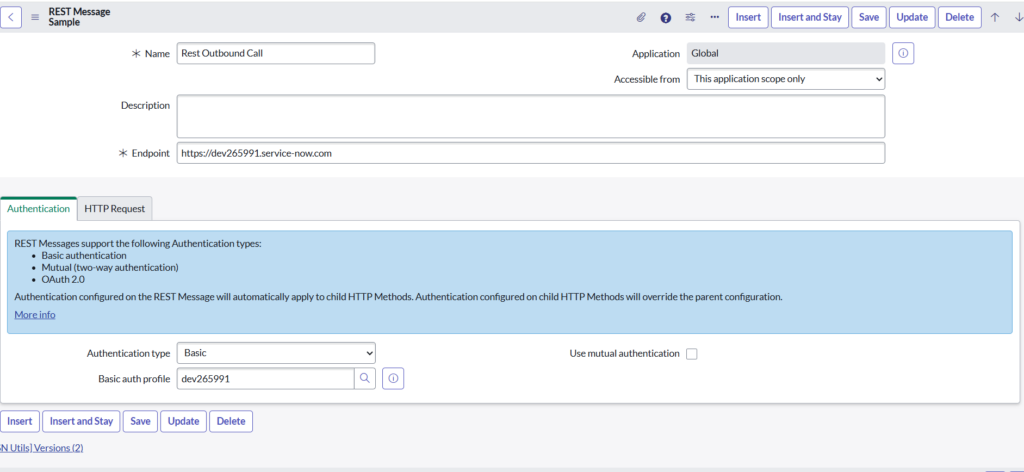
Step 1: Create REST Message (Source Instance)
Navigated to:
System Web Services → Outbound → REST Message- REST Message acts as a container for:
- Authentication
- Base endpoint
- Child HTTP methods
Authentication Configuration:
- Authentication type: Basic
- Basic Auth Profile: dev224187
- Credentials belong to a user in the target instance
This allows the source instance to securely communicate with the target instance.
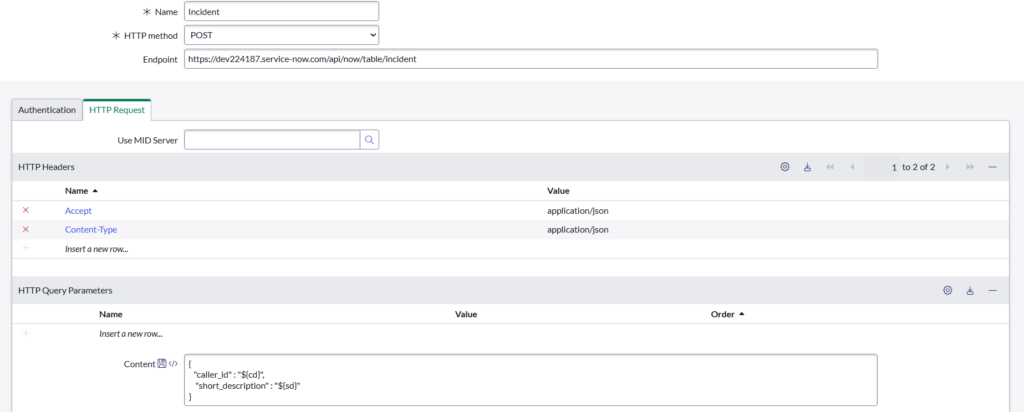
Step 2: Create HTTP Method (POST)
- Created an HTTP Method under REST Message
- HTTP Method: POST
- Endpoint:
https://dev224187.service-now.com/api/now/table/incident
Why POST?
- POST is used to create records
- Here, it creates a new Incident in the target instance
Authentication:
- Set to Inherit from parent
- Uses the Basic Auth defined in REST Message
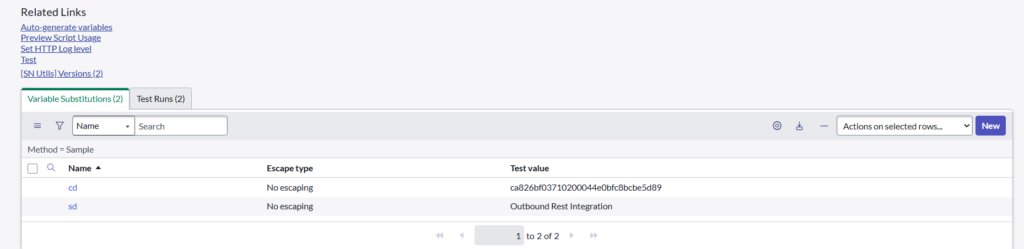
Step 3: Configure Variable Substitutions
Variable | Meaning | Source Field |
cd | Caller ID | current.caller_id |
sd | Short description | current.short_description |
Why variables are important:
- They allow dynamic data to be passed
- Same REST Message can work for any incident
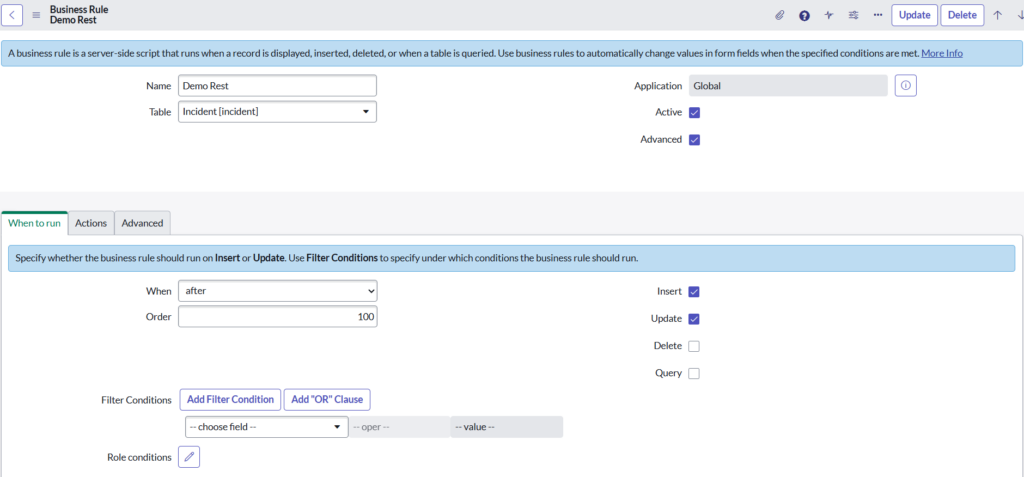
Step 4: Create Business Rule (Trigger Point)
Business Rule Details:
- Name: Demo Rest
- Table: Incident
- When: After
- Triggers on:
- Insert
- Advanced: Enabled
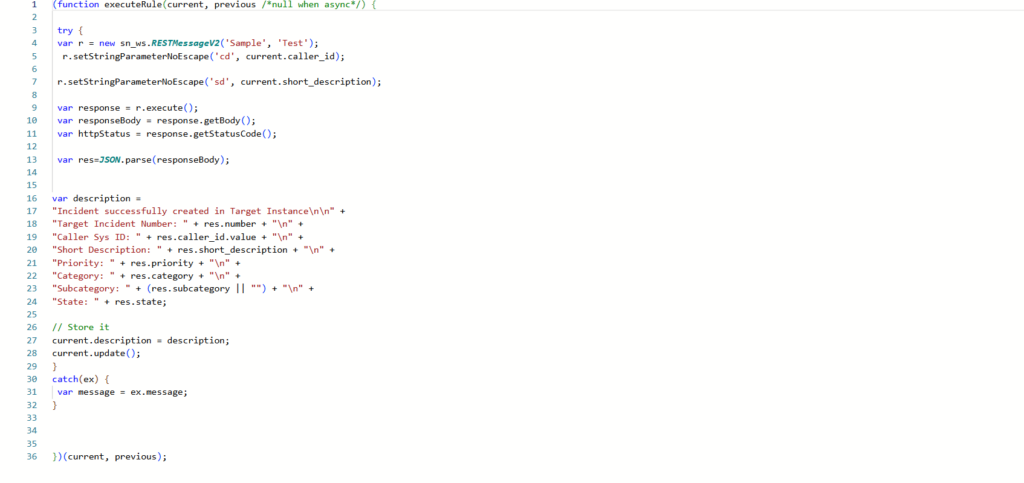
Step 5: Business Rule Script Explanation (Line by Line)
(function executeRule(current, previous /*null when async*/) {
try {
var r = new sn_ws.RESTMessageV2(‘Sample’, ‘Sample’);
🔹 Creates an object of REST Message
🔹 Refers to:
- REST Message name → Sample
- HTTP Method name → Sample
r.setStringParameterNoEscape(‘cd’, current.caller_id);
r.setStringParameterNoEscape(‘sd’,current.short_description);
🔹 Passes dynamic incident data
🔹 Maps incident fields to REST variables
var response = r.execute();
🔹 Executes the REST call
🔹 Sends data to the target instance
var responseBody = response.getBody();
gs.log(‘response:’ + responseBody);
🔹 Captures response from target instance
🔹 Logs it for debugging
var httpStatus = response.getStatusCode();
🔹 Captures HTTP status:
- 201 → Record created
- 400/401 → Error
} catch (ex) {
var message = ex.message;
}
})(current, previous);
🔹 Error handling block
🔹 Prevents Business Rule failure
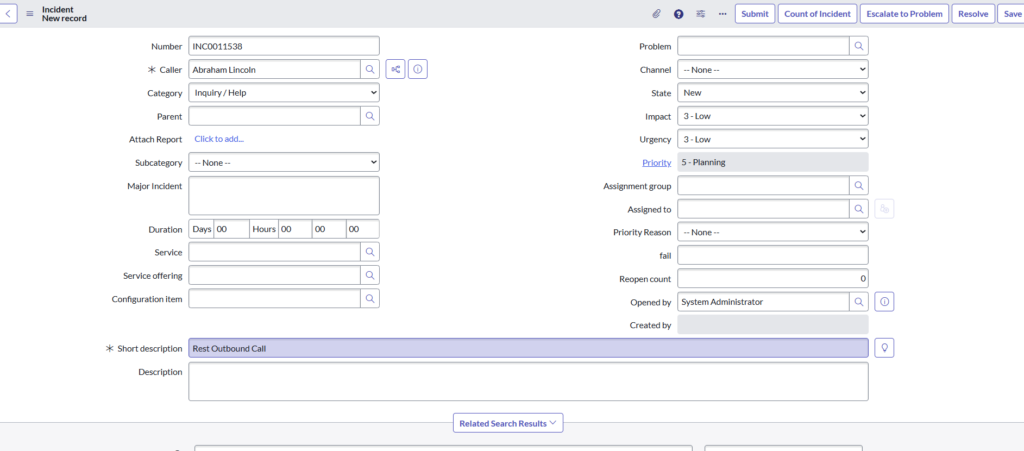
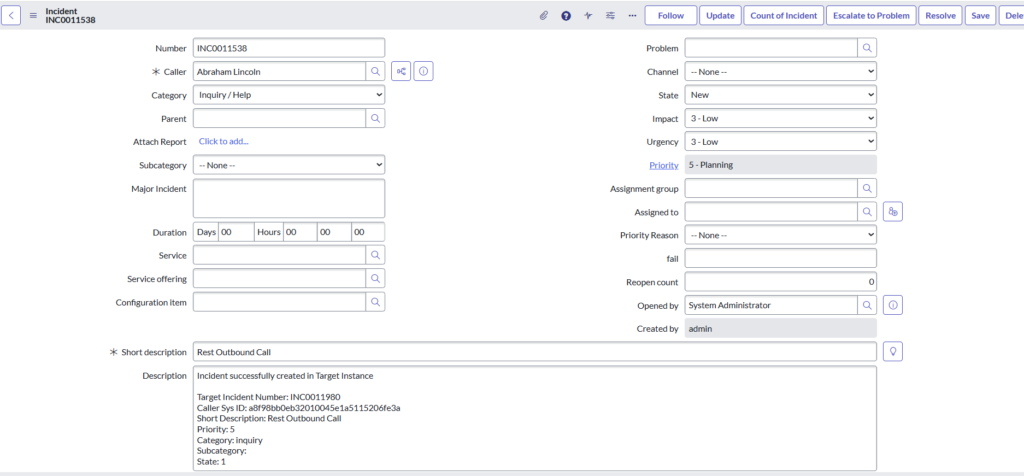
Step 6: Incident Creation (Source Instance)
What happens here:
- User creates Incident:
- Caller: Abraham Lincoln
- Short description: Rest Outbound Call
- Business Rule triggers
- REST Message executes automatically
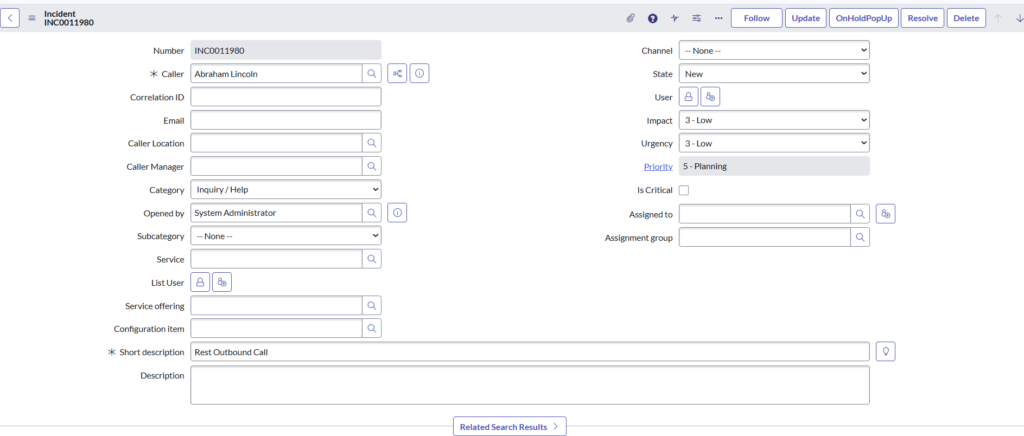
4.3 Target Instance:
Step 7: Incident Created in Target Instance
Final Result:
- Target instance receives REST call
- Incident is created via Table API
- Data matches source incident
- Integration works successfully
Source Instance:
Source instance incident description updated with target instance incident details.
- HTTP Status Codes:
HTTP status codes are three-digit responses from a server to a client’s request, indicating whether a specific HTTP request has been successfully completed. They are grouped into five distinct classes based on the first digit.
- Informational (1xx)
The server has received the request and is continuing the process.
- 100 Continue: The initial part of the request has been received; the client should proceed with the rest of the request.
- 101 Switching Protocols: The server is switching to the protocol requested in the Upgrade header (e.g., switching to WebSockets).
- Success (2xx)
The request was successfully received, understood, and accepted.
- 200 OK: The standard response for successful HTTP requests.
- 201 Created: The request has been fulfilled and resulted in a new resource being created.
- 204 No Content: The server successfully processed the request but is not returning any content (common for DELETE operations).
- Redirection (3xx)
Further action needs to be taken by the user agent to complete the request.
- 301 Moved Permanently: The resource has been permanently moved to a new URL. This is critical for SEO link equity.
- 302 Found: The resource is temporarily located at a different URL.
- 304 Not Modified: Tells the browser the cached version is still valid, saving bandwidth.
- Client Error (4xx)
The request contains bad syntax or cannot be fulfilled.
- 400 Bad Request: The server cannot process the request due to a perceived client error (e.g., malformed request syntax).
- 401 Unauthorized: Authentication is required and has failed or has not yet been provided.
- 403 Forbidden: The server understood the request but refuses to authorize it (unlike 401, authenticating will not help).
- 404 Not Found: The server cannot find the requested resource.
- 429 Too Many Requests: The user has sent too many requests in a given amount of time (rate limiting).
- Server Error (5xx)
The server failed to fulfill an apparently valid request.
- 500 Internal Server Error: A generic error message when an unexpected condition was encountered.
- 502 Bad Gateway: The server, acting as a gateway, received an invalid response from the upstream server.
- 503 Service Unavailable: The server is currently unable to handle the request (often due to maintenance or overloading).
- 504 Gateway Timeout: The server, acting as a gateway, did not receive a timely response from the upstream server.