
Dependent Choice Field in ServiceNow
What is choice field?
A Choice field is a predefined dropdown list that restricts user input to specific allowed values. These choices are stored in the sys_choice table.
What is a Dependent Choice Field?
Dependent Choice fields change their values based on another field.
Scenario: -
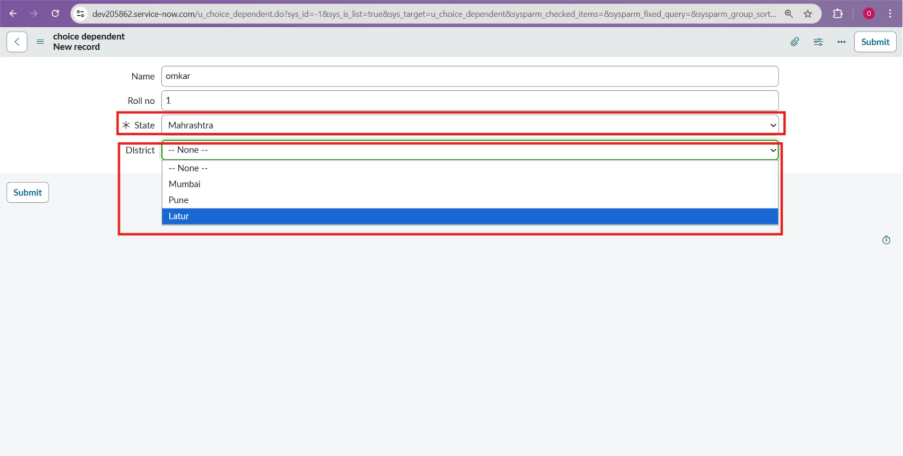
A college management system wants to store student details. While creating a student record, the user should first select the State, and based on the selected state, only the relevant districts should appear in the district dropdown.
Steps For Dependent Choice Field?
- Open instance
- System Definition > Tables
- Create new table with fields: –
- Name(String)
- Rollno(String)
- State(Choice)
- District(Choice)
- Right click on state > configure dictionary > choices related list > New > Add choices.
Choice
Dependent Value
Maharashtra
MH
Rajasthan
RJ
Gujrat
GJ
- Submit.
- Right click on District > configure dictionary > choices related list > New > Add choices
Choice
Value
Sequence
Dependent value
Mumbai
Mumbai
1
MH
Latur
Latur
2
MH
Raipur
Raipur
1
RJ
Kota
Kota
2
RJ
Surat
Surat
1
GJ
Baroda
Baroda
2
GJ
- Advance view > Dependent field > click on use Dependent field > from dropdown select Dependent field (state) > submit > check results.
- Dependent Choice filled created successfully.
Conclusion: -
Choice fields are essential in ServiceNow development because they help maintain structured and consistent data. They are widely used in Incident, Change, Problem, and custom applications. Understanding choice fields is important for both ServiceNow developers and administrators.