
OnChange Client Script
An onChange Client Script runs on the client side (browser) when the value of a field changes on a form.
- It is mainly used to:
- Show or hide fields
- Make fields mandatory or read-only
- Auto-populate fields
- Call Script Includes using GlideAjax
- Validate user input instantly
Lorem ipsum dolor sit amet, consectetur adipiscing elit. Ut elit tellus, luctus nec ullamcorper mattis, pulvinar dapibus leo.
1.1 Running onChange Client Script As onLoad Client Script
When a form loads:
- ServiceNow sets default values for fields
- Values are populated from the database
- The platform internally fires change events for those fields
Because of this, the onChange script gets executed once during form load.
1.1.1 Scenario
When User is not selected, all the fields should be Read Only, and when user is selected, all the fields can be editable.
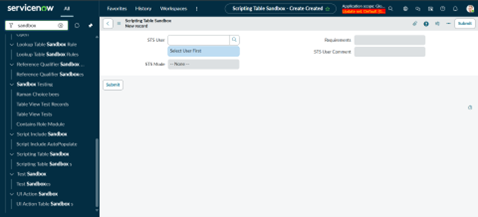
Create New Client Script
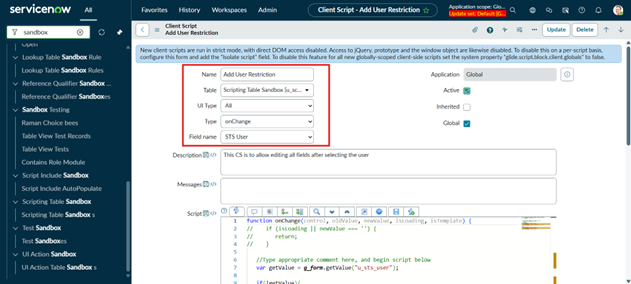
Give name-> Add User Restriction, Type -> onChange, Field Name -> STS User
Add Script, comment out first “if statement” or remove it, it will make the onChnage client script run as onLoad Client Script.
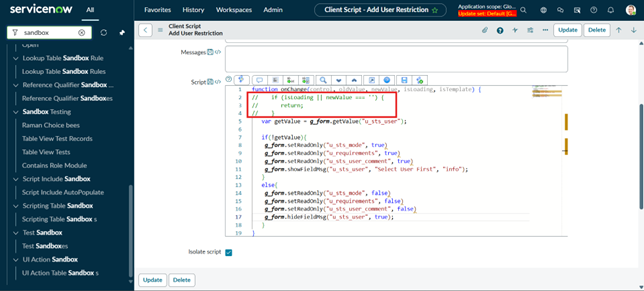
Script:
function onChange(control, oldValue, newValue, isLoading, isTemplate) {
// if (isLoading || newValue === ”) {
// return; }
var getValue = g_form.getValue(“u_sts_user”);
if(!getValue){
g_form.setReadOnly(“u_sts_mode”, true)
g_form.setReadOnly(“u_requirements”, true)
g_form.setReadOnly(“u_sts_user_comment”, true)
g_form.showFieldMsg(“u_sts_user”, “Select User First”, “info”);
}
else{
g_form.setReadOnly(“u_sts_mode”, false)
g_form.setReadOnly(“u_requirements”, false)
g_form.setReadOnly(“u_sts_user_comment”, false)
g_form.hideFieldMsg(“u_sts_user”, true);
}
}
In this script, the “isLoading” check is commented out, allowing the onChange Client Script to run during form load. When the form initializes, ServiceNow sets the value of “u_sts_user”, which triggers the script and locks related fields until a user is selected. This ensures the form remains controlled both on load and during user interaction.
1.2 Summary:
onChange Client Scripts make ServiceNow forms more interactive by responding immediately to field value changes. In some cases, these scripts also run during form load because field values are initialized in the background. Understanding the role of the isLoading parameter helps maintain predictable behavior and ensures a clean, well-controlled form experience.