1. What is Policy?
- A policy is a formal, high-level statement that defines an organization’s rules, expectations, and guiding principles.
- It sets the direction for how the organization operates and outlines what must be done to meet business goals, comply with regulations, and manage risks.
- A policy defines an internal practice that an organization or business process must follow to ensure compliance and reduce risk exposure.
- In simple words, A policy tells people what needs to be done and why it matters.
- Example – Employees must store company data only on approved, encrypted systems and are not allowed to save sensitive information on personal devices or share it through unauthorized applications.
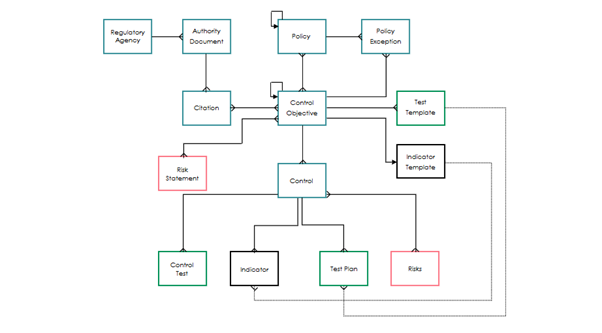
2. Policy and Compliance Architecture
3. Roles Required
Role Name | Description |
Compliance Reader [sn_compliance.reader]
| Read-only access to compliance data for reporting and monitoring. |
Compliance User [sn_compliance.user] | Performs core compliance tasks: create policies, manage controls, test effectiveness, handle exceptions |
Compliance Manager [sn_compliance.manager] | Manages daily compliance operations: approves policies, sets acknowledgements, monitors controls, produces reports. |
Compliance Administrator [sn_compliance.admin]
| Administers compliance application and data, manages dependencies and full configuration. |
Compliance Developer [sn_compliance.developer]
| Builds workflows, dashboards, reports, and platform components to enhance compliance processes. |
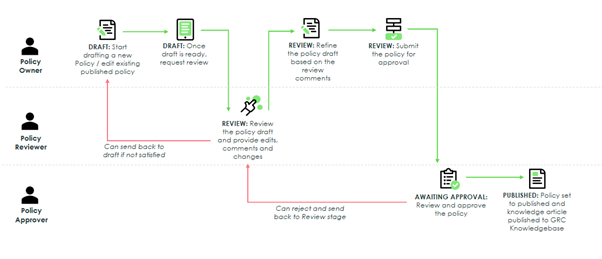
4. Process Flow Diagram for Policy

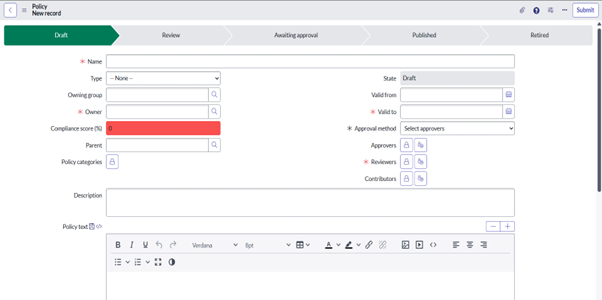
- Sections
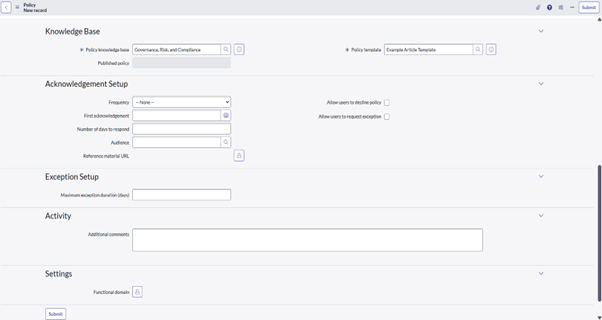
6. Policy All Fields
Field | Description |
Name | Title of the policy document. |
Type | Category or kind of policy (e.g., Standard, Guideline, Framework). |
Owning group | The team or department responsible for owning the policy. |
Owner | The person responsible for the policy’s maintenance and governance. |
Compliance score (%) | The calculated compliance percentage for this policy. |
Parent | A higher‑level policy under which this policy is nested. |
Policy categories | Classification tags or groups used to group similar policies. |
State | Current lifecycle stage of the policy (e.g., Draft, Published, Retired). |
Valid from | The date from which the policy takes effect. |
Valid to | The date until which the policy remains valid (expiry). |
Approval method | The method by which the policy must be approved. |
Approvers | The individuals or roles who must approve the policy. |
Reviewers | The individuals or roles responsible for reviewing the policy content. |
Contributors | Individuals or roles who contribute content or updates to the policy. |
Description | A short summary of what the policy covers. |
Policy text | The full detailed text of the policy. |
Policy knowledge base | The repository or knowledge base where this policy is stored. |
Published policy | The specific published policy record this setup relates to. |
Policy template | The predefined template used to structure and format this policy. |
Frequency | How often users must acknowledge this policy (e.g., annually). |
First acknowledgement | The date when users must first acknowledge the policy. |
Number of days to respond | How many days users have to complete their acknowledgement. |
Audience | The group of users who are required to acknowledge the policy. |
Reference material URL | A link to supporting documents or resources related to the policy. |
Allow users to decline policy | Enables a user option to refuse or decline the policy acknowledgement. |
Allow users to request exception | Allows users to request an exception to the policy requirements. |
Maximum exception duration (days) | The maximum number of days an approved exception can remain valid. |
Additional comments | Any notes or remarks related to the policy’s configuration or changes. |
7. Policy States and its Lifecycle
- Below flow represents the standard policy lifecycle within a GRC system.
- Each stage is a formal status that shows where the policy is in its journey from creation to retirement.
1. Draft
- This is the creation stage and Policies are created in Draft by default
- A new policy is being written for the first time, or an existing policy is being heavily revised.
- The Policy Owner (often a subject matter expert or manager) works with stakeholders (like Legal, IT Security, or HR) to write the content.
- Goal is to create the first complete version of the policy document that addresses a specific risk, regulation, or business need.
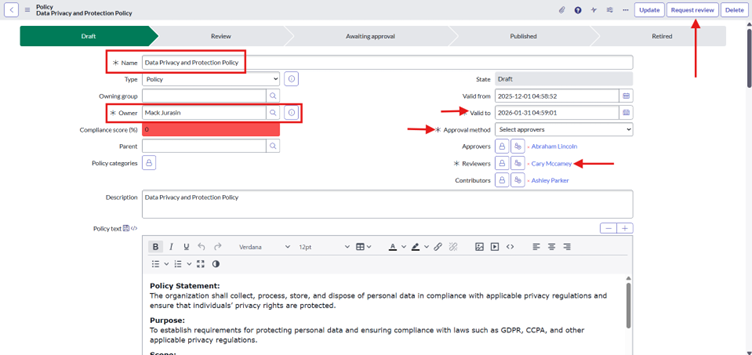
- Fill the mandatory fields along with other fields and then click on ‘Request Review’ UI button and fill the Message given below then state will change from Draft to Review.

2. Review
- The draft is complete and is now being circulated to a formal review team.
- This group includes reviewers and key stakeholders. These are often department heads, the GRC team, and the Legal/Compliance department.
- While in Review, reviewers can send the policy back to draft, edit the policy, can add additional comments
- Goal is to ensure the policy is accurate, clear, enforceable, and aligned with existing policies and regulations.
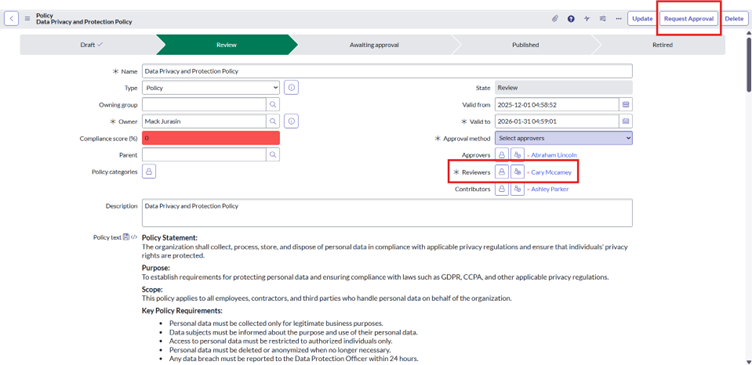
- Reviewer will review the policy and then click on ‘Request Approval’ UI Action the provide message then state will change from Review to Awaiting Approval.
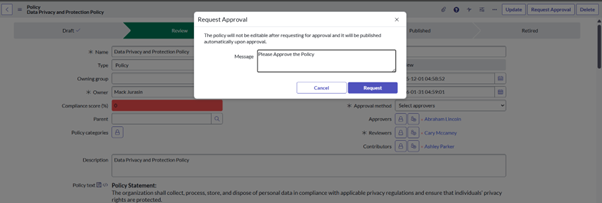
3. Awaiting Approval
- Approvers receive the approval task in Awaiting approval and approvers can send the policy back to Review
- The policy has been reviewed, all feedback has been incorporated, and the final version is now locked. It is waiting for a final “go-live” signature.
- This is usually one or more designated Approvers, such as a committee, or the head of the business unit.
- Goal is to get formal, auditable sign-off that the policy is officially accepted by the organization’s leadership.
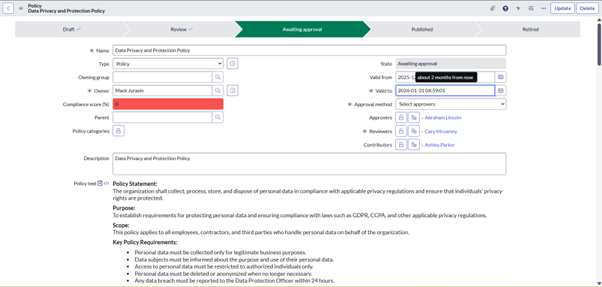
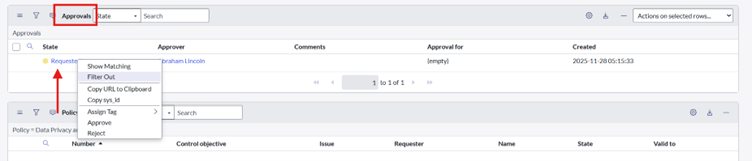
- Check Related List > Once Approved state will change from Awaiting Approval to Published.
4. Published
- Policy is published after approval
- The policy is now active and is the official standard for the organization.
- The GRC team or system administrator publishes the policy to a central portal.
- KB article is created in the KB identified on the policy record.
- Goal is to publish the policy so it is accessible to employees and to trigger supporting activities such as communication, employee attestation, and mapping to related controls.
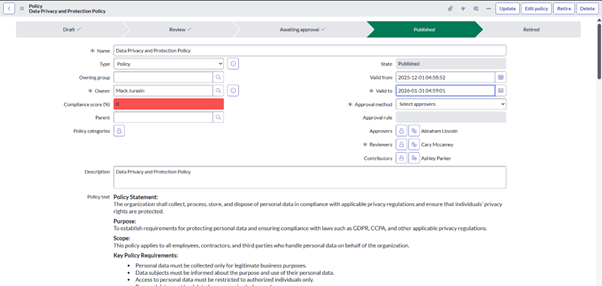
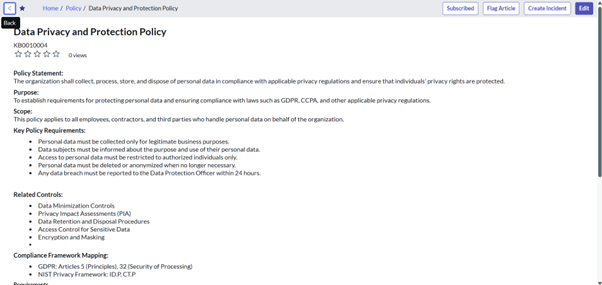
- KB Article is created for the Policy

- KB Article
5. Retired
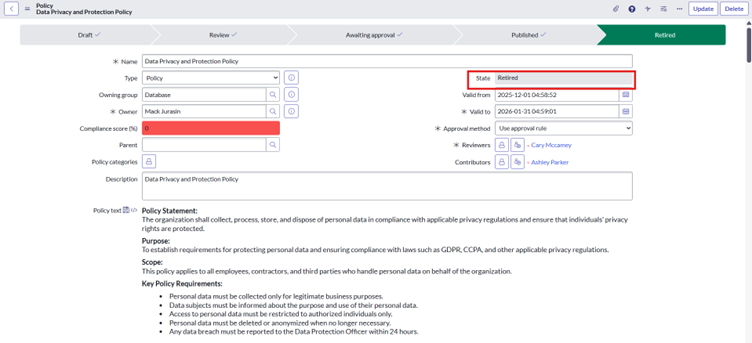
- The policy is no longer active or relevant.
- The Policy Owner, with approval from GRC/Legal, initiates the retirement.
- When a policy is retired, the KB article also retires.
- Goal is to retire the policy by removing outdated or unnecessary content—whether it is obsolete, superseded by a newer policy, or consolidated into another policy.
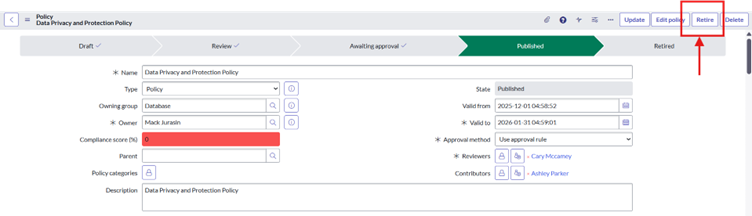
- Click on Retire UI action then state will change to Retired from Published.
7.1. Approval Rule
- An approval rule in Policy GRC is a predefined set of conditions that determines who must approve a policy or policy-related activity.
- It automatically routes the policy to the correct approvers based on attributes like department, policy type, risk level, or ownership.
- Example – We are creating Multilevel Approval for policy, Level 1 approval for policy owner and level 2 approval for owning group.
- Navigate to ALL > Policy and Compliance > Policies and Procedures > Policy Approval Rules > New
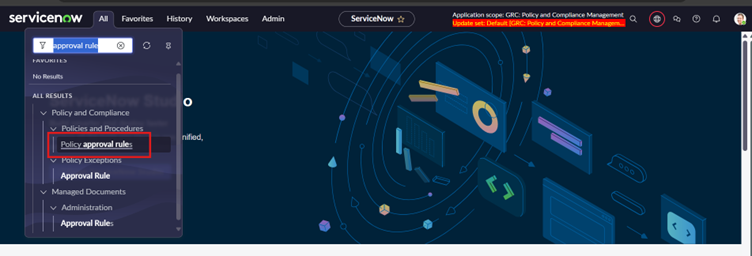
- Select Approval Rule in Policy
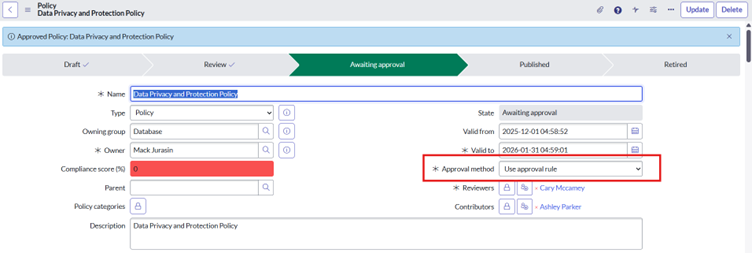
- Create Approval Configuration with required fields
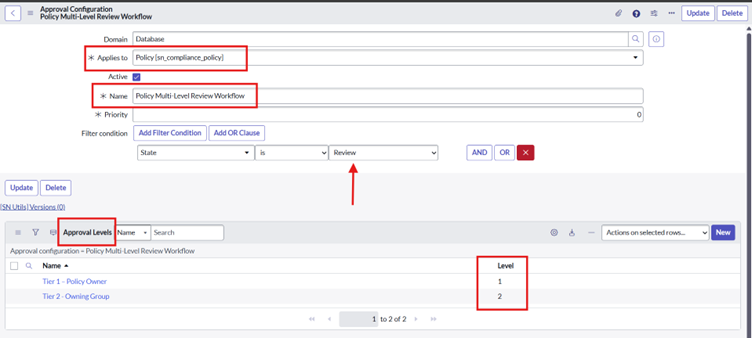
- Create Approval Level 1
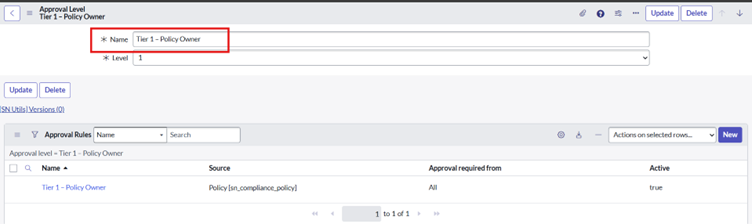
- Also Create Approval Rules for the Tier-1 with filter condition
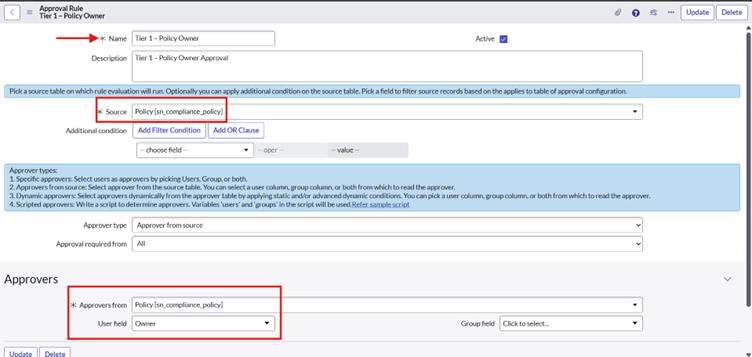
- Similarly, Create Approval Level 2
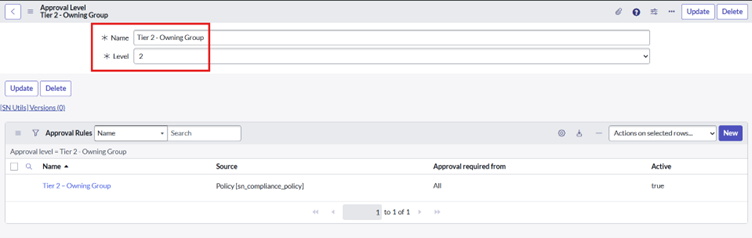
- Also Create Approval Rules for the Tier-2 with filter condition
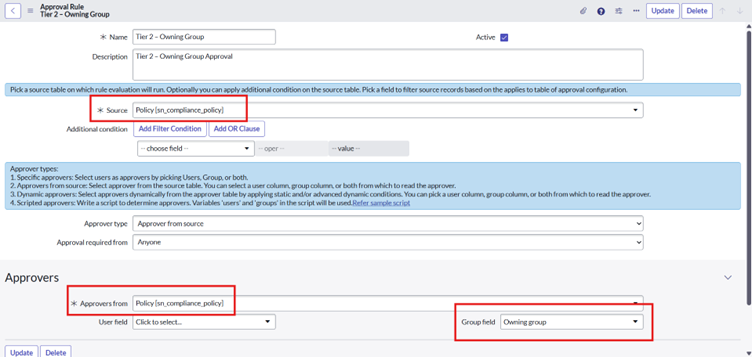
- Now, Test the Approval Rule
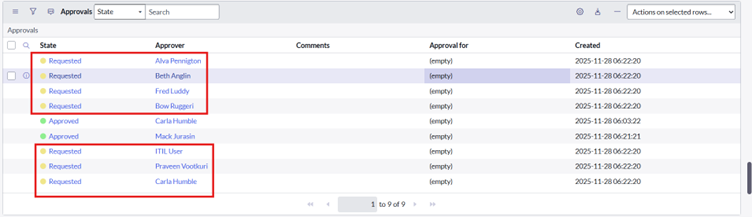
- 1st Level Approval

- If Approved then only 2nd level approval came
7.2. Policy Versions
- Policy versions are sequential iterations of a policy created whenever updates or changes are made.
- Each version records the policy’s exact content at a specific time, providing a clear and auditable history of modifications and approvals.
- Once policy goes to Published state v1.0 created

- If policy goes to draft again and then published then version will change to v2.0