
Problem Management
Multiple users face the same issue, then the problem is created.
Problem Management is an ITSM process focused on
identifying, analysing, and eliminating the root causes behind incidents.
Instead of repeatedly fixing surface-level symptoms, it goes deeper to
understand why an issue occurred in the first place. By performing detailed
investigations and root cause analysis, Problem Management helps prevent
incidents from happening again, ensures long-term stability of services, and
reduces the number of recurring disruptions. It also supports the business by
improving service quality and helping IT teams work more efficiently.
Even when a permanent fix is not immediately
possible, Problem Management works to reduce the impact of unavoidable problems
by implementing reliable temporary solutions, improving monitoring, and
optimizing processes. In simple terms, Incident Management restores service
quickly by treating the symptoms, while Problem Management ensures those
symptoms never return by curing the actual disease.
1.3 A Problem can be created in two ways:
When several users start reporting the same issue—for example, many
employees cannot access email or multiple systems are slowing down—the
technician understands that this is not just a one-time incident but a
repeating or widespread problem. Instead of treating each incident separately,
the technician can link all similar incidents together in the Incident table.
This helps identify a common pattern. From these linked incidents, the
technician can then create a Problem record, which focuses on investigating the
underlying root cause. By doing this, the team ensures they are not just
resolving the symptoms for each user but are working toward finding and fixing
the main reason behind the repeated issue.
How to create Problem using Incident:
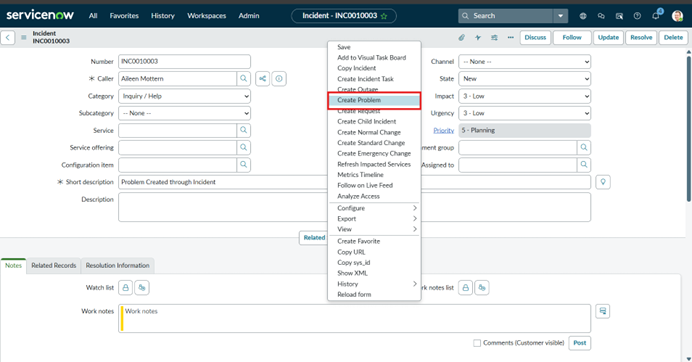
After Creating Incident right click on upper line and select option ‘Create Problem’ and then it goes to Problem window.
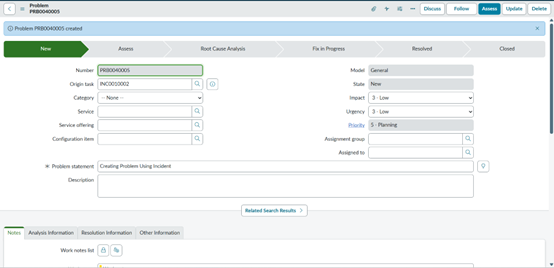
- Directly from the Problem Table we ca create Problem. A Problem can also be logged manually when a major issue or pattern is identified.
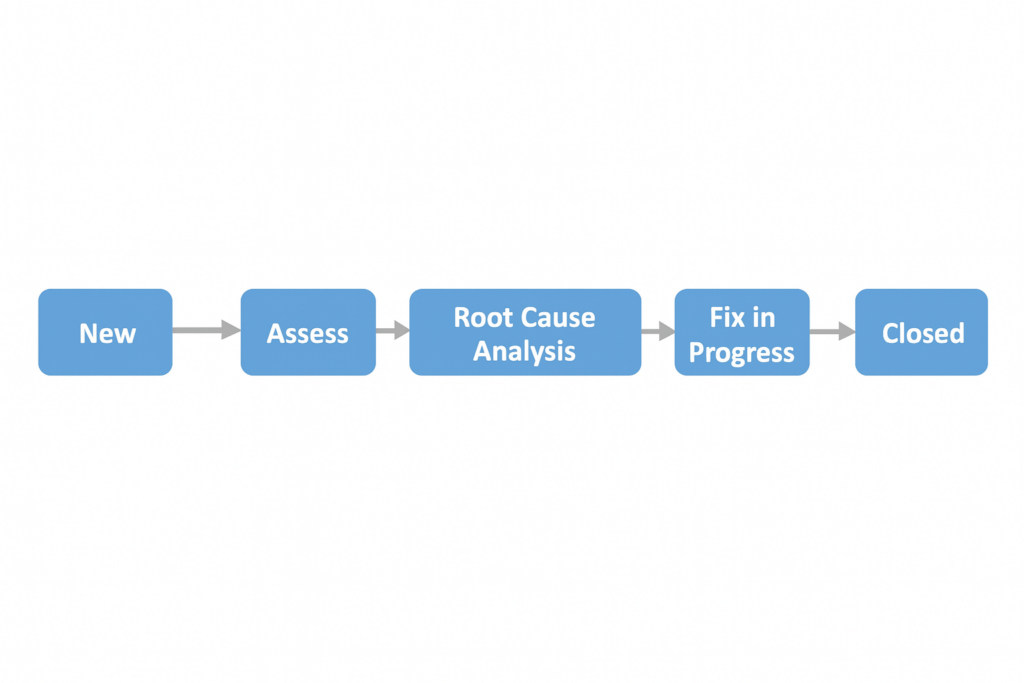
2.1 New:
- When a Problem is created, it must be assigned to the right person and the right support group so that the investigation can begin.
- This is done using the Assigned to and Assignment group The Assignment group identifies which team is responsible for analyzing and resolving the Problem—for example, the Network Support team, Database team, or Application team. The Assigned field specifies the individual technician within that group who will work on the Problem.
- Assigning the Problem correctly ensures that the issue is handled by someone with the proper skills and that there are clear ownership and accountability during the entire investigation and resolution process.
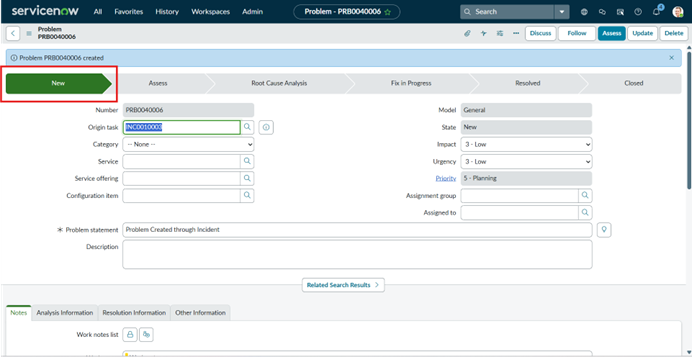
After clicking Assess, the Problem moves to the next state.
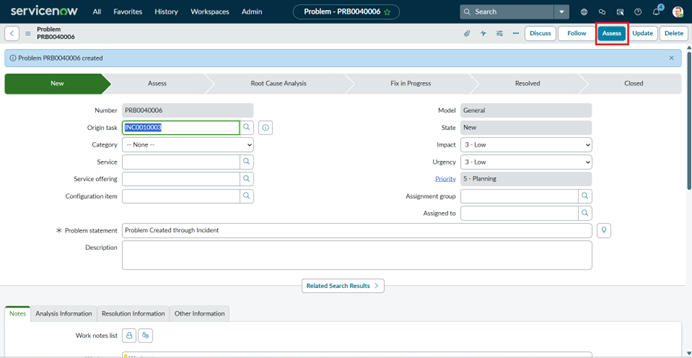
2.2 Assess:
- During the assessment stage, the Problem Coordinator reviews the Problem to fully understand its scope, impact, and validity. The coordinator checks whether the issue reported truly qualifies as a Problem or if it was logged by mistake. To do this, they gather any missing details, analyze the information provided, and verify whether similar Problems already exist in the system.
- If an identical Problem is found, the coordinator should not create another one—instead, they must mark the new entry as Duplicate and clearly write a reason, such as referencing the existing Problem record. This avoids confusion and prevents multiple teams from working on the same issue. However, if the coordinator confirms that the Problem is valid and unique, it moves forward to the Root Cause Analysis (RCA) stage, where the team begins investigating the underlying cause in depth.
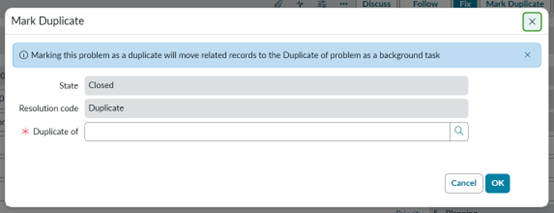
When the coordinator clicks on confirm, it will go to the next state.
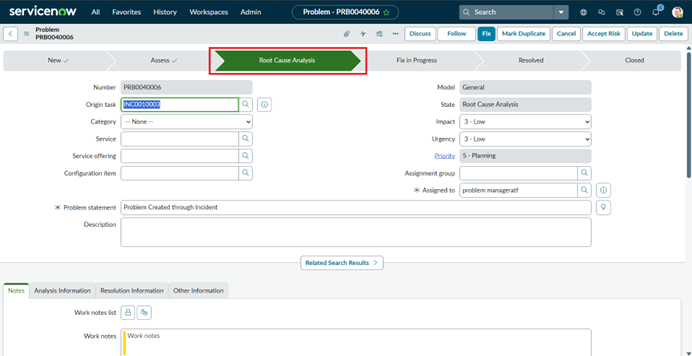
2.3 Root cause analysis:
- This is the most critical stage.
- The team investigates deeply to identify:
- What caused the issue?
- Why did it occur?
- How can we prevent it in the future?
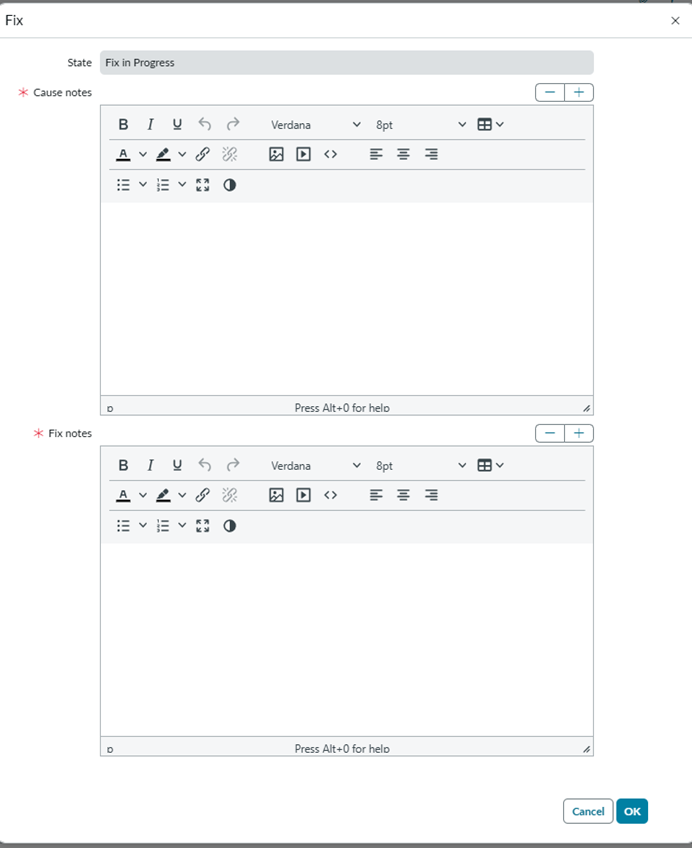
Mandatory fields:
- Cause Notes
- Fix Notes
After analysis, the Problem transitions to Fix in Progress. If the coordinator chooses “Risk Accepted,” the Problem directly moves to Closed, and the following become mandatory:
- Cause Notes
- Risk Accepted Reason
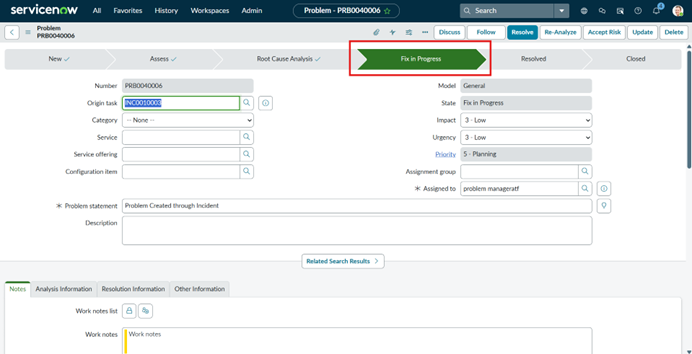
2.4 Fix in progress:
- In this stage, the team focuses on applying a permanent fix that will completely remove the root cause identified during the analysis phase.
- Their goal is not just to temporarily patch the issue but to implement a long-term solution that ensures the problem does not occur again.
- Once the fix is ready, ServiceNow provides specific UI Actions to control the workflow. When the technician clicks Resolve, the Problem record moves to the Resolved state, indicating that the permanent solution has been applied and the issue is considered fixed.
- If, during implementation, the team realizes that the fix is not sufficient or the root cause needs to be re-evaluated, they can click Re-Analyse, which sends the Problem back to the Root Cause Analysis stage.
- This ensures that only fully verified and effective solutions move forward, maintaining accuracy and quality in the Problem Management process.
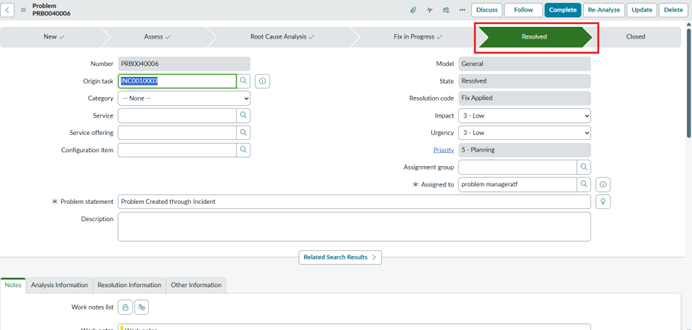
2.5 Resolved:
- After the permanent fix has been successfully applied, the system or service enters a monitoring or observation period.
- During this time, the support or monitoring team closely watches the affected service to ensure that the issue does not reappear and that the fix is functioning as expected in real conditions.
- This step is important because some problems may seem resolved immediately but could resurface if the solution is not fully effective.
- Once the monitoring team confirms that everything is stable and the fix is working smoothly without any recurrence, the technician can click Complete.
- This action officially moves the Problem into the Closed state, indicating that all work is finished, and the Problem is fully resolved.
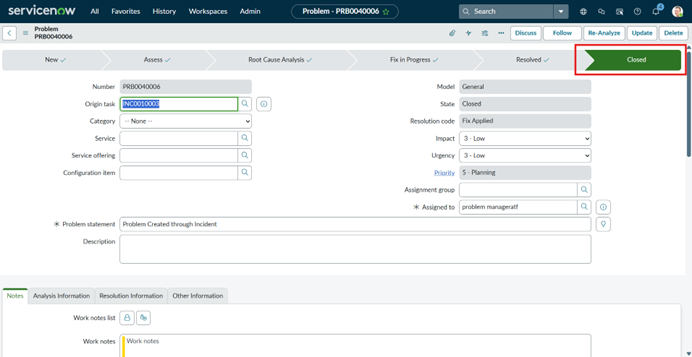
2.6 Closed:
- In the final stage, the Problem has been completely validated, monitored, and confirmed to be resolved.
- When the Problem record is officially closed, it means the permanent fix has been successful, the service is stable, and no further investigation is required. At this point, the support team may also review all the related incidents that were linked to this Problem to ensure they are properly updated, resolved, and closed.
- This cross-check helps confirm that users are no longer experiencing the issue and that nothing has been overlooked. Closing the Problem formally marks the completion of the entire Problem Management cycle.
Field Name | Description | ||
Number | Unique auto-generated Problem record ID (e.g., PRB0001234). | ||
State | Current stage of the Problem (Draft, Assess, Root Cause Analysis, Fix in Progress, Resolved, Closed) | ||
Problem Statement / Short Description |
| ||
Description |
| ||
Category |
| ||
Subcategory |
| ||
Configuration Item (CI) |
| ||
Assignment Group |
| ||
Assigned To | The individual responsible for handling the problem | ||
Priority | Determines urgency + impact to calculate problem priority | ||
Impact | Effect of the problem on the business | ||
Urgency | How quickly the problem needs attention | ||
Known Error? | Checkbox to mark if the issue is a known error with a workaround | ||
Workaround | Temporary fix or action to reduce issue impact | ||
Root Cause | The actual reason why the issue occurs | ||
Cause Code | Optional field for categorizing root cause (depends on configuration) | ||
Target Date -Resolution | When the permanent fix is expected to be completed | ||
Target Date – Root Cause | Estimated date to identify/find the root cause | ||
Related Incidents | List of incidents linked to this problem | ||
Related Changes | Shows change requests created to resolve the problem | ||
Opened By | User who created the problem record | ||
Opened Date | Date and time when the problem was created | ||
Updated | Date/time of the last update | ||
Closed By | Person who closed the problem | ||
Closure Notes | Detailed notes explaining the resolution or closure details | ||
Knowledge Checkbox | If checked, a knowledge article will be created at closure (custom requirement in many setups) | ||
Risk | Optional field capturing risk level for fixes. | ||
Business Service | The higher-level business service impacted by the problem | ||
Environment | Optional field (Production/Development/Test) |
Problem Management helps organizations shift from constant reactive firefighting to a more proactive and stable IT environment. Instead of repeatedly addressing the same incidents, teams focus on uncovering the root cause and implementing permanent fixes that prevent issues from returning. This proactive approach reduces downtime, minimizes disruptions, and strengthens overall service reliability. As a result, employees experience fewer interruptions, productivity increases, and the organization delivers a smoother, more efficient user experience. By eliminating recurring problems, Problem Management becomes a key driver of long-term operational stability and customer satisfaction.