SetWorkflow and autoSysFields Methods
SetWorkflow
In the ServiceNow, setWorkflow() is generally used to prevent the running of business rules (or other scripts) that would be triggered by any server side updates you’re making.
setWorfklow can be used in any server-side script, including Business Rules, Script Includes, Scheduled Jobs, and (server-side) UI Actions.
The setWorkflow() method utilizes a single boolean argument of either true or false. The arguments are written as follows:
- setWorkflow(false): All business rules on the table for the current scripted action (insert, update, delete, query) will be ignored.
- setWorkflow(true): All business rules on the table for the current scripted action (insert, update, delete, query) will be executed.
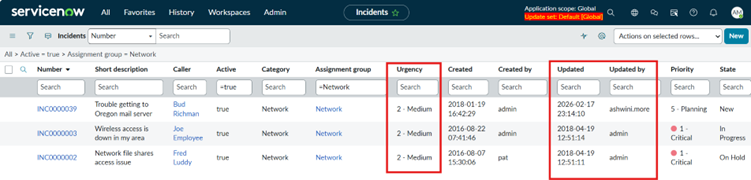
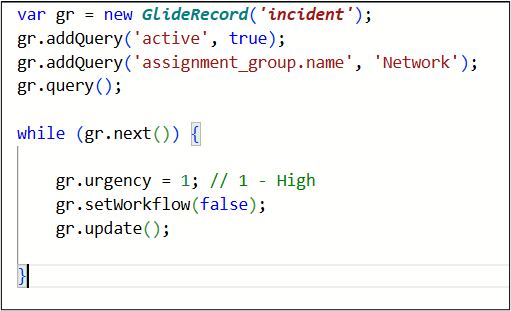
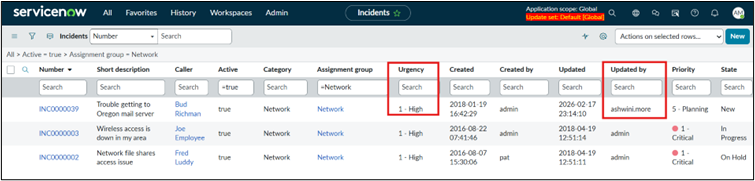
For example, Update the Urgency to High for all active Incidents where the Assignment Group is Network, without triggering any Business Rules that would normally execute during the update.
Autosysfields
autoSysFields is used to to control whether the system automatically updates “system” fields when a record is inserted or updated.
By default, ServiceNow manages five specific fields for every record, Created by [sys_created_by],Created [sys_created_on], Updated [sys_updated_on], Updated by [sys_updated_by], Updates [sys_mod_count],
The autoSysFields () method utilizes a single boolean argument of either true or false. The arguments are written as follows:
- autoSysFields(false): When autoSysFields is set to false, system field values will not be updated.
- autoSysFields(true): When autoSysFields is set to true, system field values will be updated.
For example, if we use the same script that includes the setWorkflow(false) method and additionally add autoSysFields(false), the urgency field will be updated to Medium. However, the system fields (such as Updated by, Updated on, etc.) will not be modified and will remain unchanged.
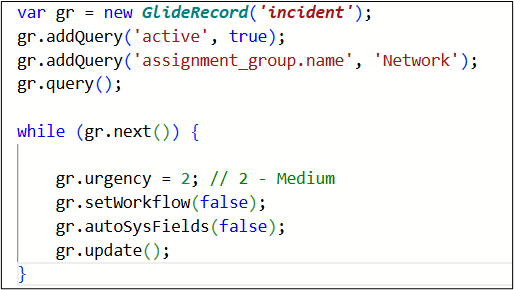
Here, we can observe that the system fields Updated and Updated by are not refreshed with the latest timestamp or user name.