SOAP Integration
1.SOAP Integration:
SOAP (Simple Object Access Protocol) in ServiceNow is a protocol for exchanging structured data, primarily XML, used for integration with other systems, allowing ServiceNow to act as a web service provider or consumer by creating inbound (scripted) or outbound (SOAP Message) services, defining WSDLs, and managing security through roles like soap script, contrasting with REST’s architectural style but both serving data exchange needs within the platform.
2.Types of SOAP Integrations:
ServiceNow facilitates both inbound and outbound SOAP communications through different methods:
2.1 Inbound (Exposing ServiceNow data/logic to external systems)
- Direct Web Services: These are automatically generated for every table in the system, providing standard methods like get, getKeys, insert, update, and delete if the user account has the appropriate roles (e.g., soap role).
- Scripted SOAP Services: For more complex, custom logic and operations not covered by direct web services, developers can create scripted SOAP services. These allow for full control over the incoming request (input parameters) and outgoing response (output parameters) using server-side JavaScript.
2.2 Outbound (Consuming external web services from ServiceNow)
- SOAP Message Functionality: ServiceNow provides a capability to define and send SOAP messages to external endpoints.
3.WSDL :
All tables and import sets dynamically generate Web Service Definition Language (WSDL) XML documents that describe its table schema and available operations.
You can obtain a table’s WSDL by issuing a URL call to your instance that contains the name of the table and the WSDL parameter.
For example:
https://myinstance.service-now.com/incident.do?WSDL
- REST vs SOAP:
No | SOAP | REST |
1. | SOAP is a protocol. | REST is an architectural style. |
2. | SOAP stands for Simple Object Access Protocol. | REST stands for Representational State Transfer. |
3. | SOAP can’t use REST because it is a protocol and can use any protocol like HTTP, SOAP. | REST can use SOAP web services because it is a concept |
4. | SOAP uses services interfaces to expose the business logic. | REST uses URI to expose business logic. |
5. | SOAP defines standards to be strictly followed. | REST does not define too much standards like SOAP. |
6. | SOAP requires more bandwidth and resource than REST. | REST requires less bandwidth and resource than SOAP. |
7. | SOAP defines its own security. | RESTful web services inherits security measures from the underlying transport. |
8. | SOAP permits XML data format only. | REST permits different data format such as Plain text, HTML, XML, JSON etc. |
9. | SOAP is less preferred than REST. | REST more preferred than SOAP. |
- Use Case:
Integrate two ServiceNow instance. Every time when incident is created in one ServiceNow instance (source) then incident record with same information will also get created in another ServiceNow instance (target).
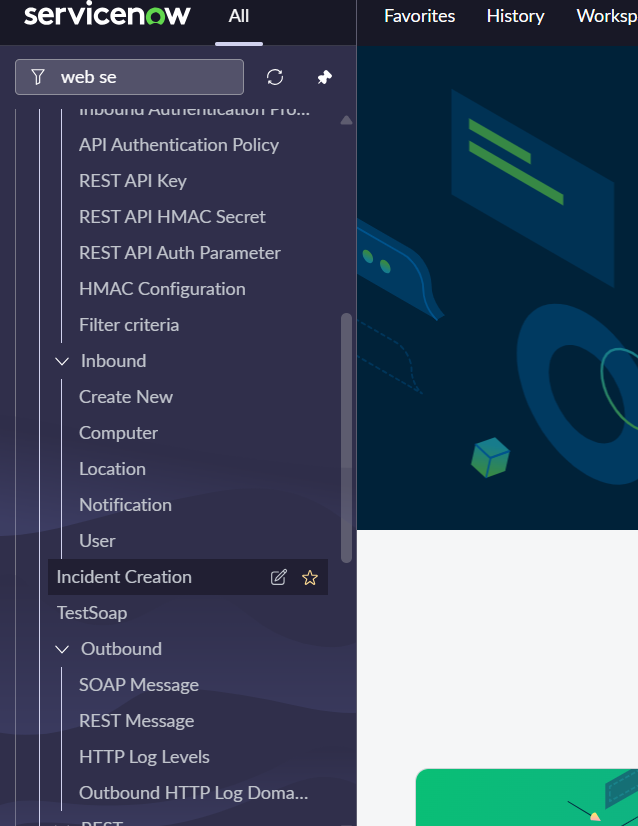
5.1. Complete the Target Instance Setup (Inbound)
created an Inbound SOAP Web Service that allows external systems to send SOAP requests to ServiceNow.
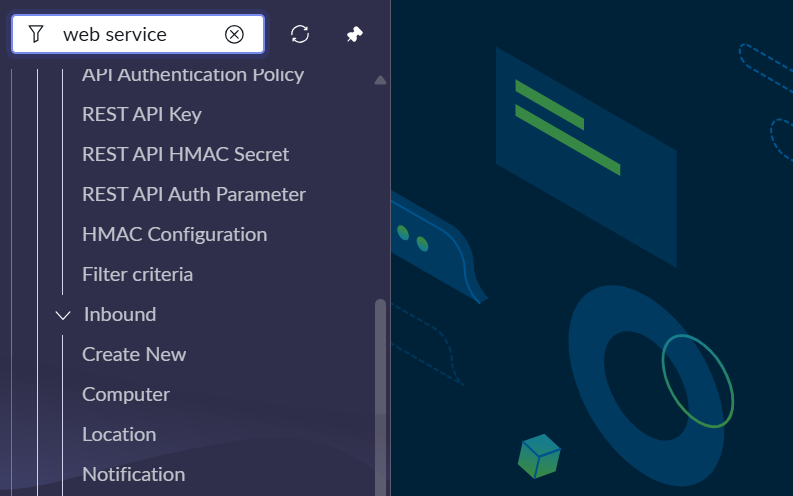
- Target Table: Incident [incident].
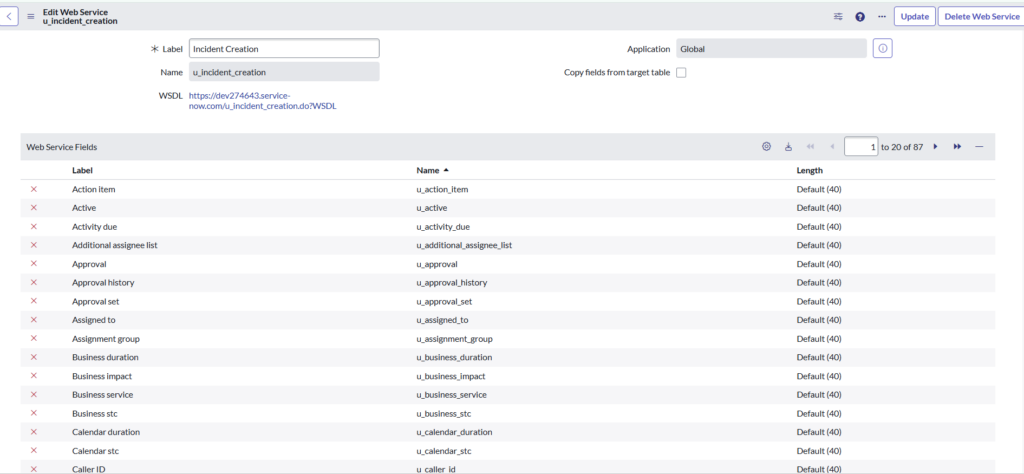
- Fields: Click “Create” on that form. ServiceNow will automatically create a staging table (likely called u_incident_creation) and a Transform Map.
- The WSDL: Once you hit Create, the system generates a WSDL for this specific staging table. The URL will look like this: https://<TARGET_INSTANCE>.service-now.com/u_incident_creation.do?WSDL
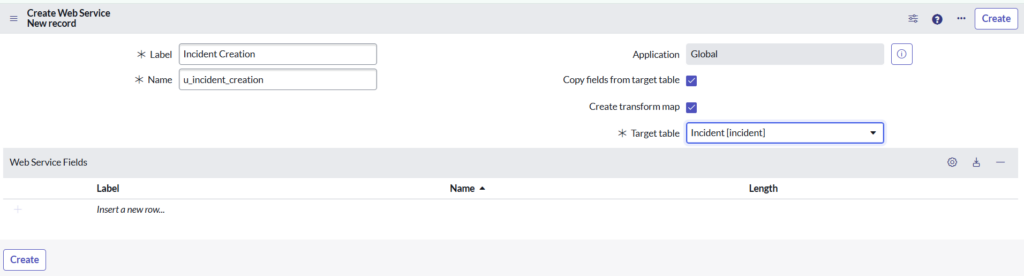
5.1.1 : Import Table (u_incident_creation)
- This table temporarily stores incoming SOAP data.
- Fields like:
- u_caller_id
- u_short_description
- u_number
- u_active
- etc.
Why this is needed?
SOAP does not insert directly into incident.
Instead:
SOAP → Import table → Transform map → Incident
This gives: Validation
Mapping control
Business rule execution
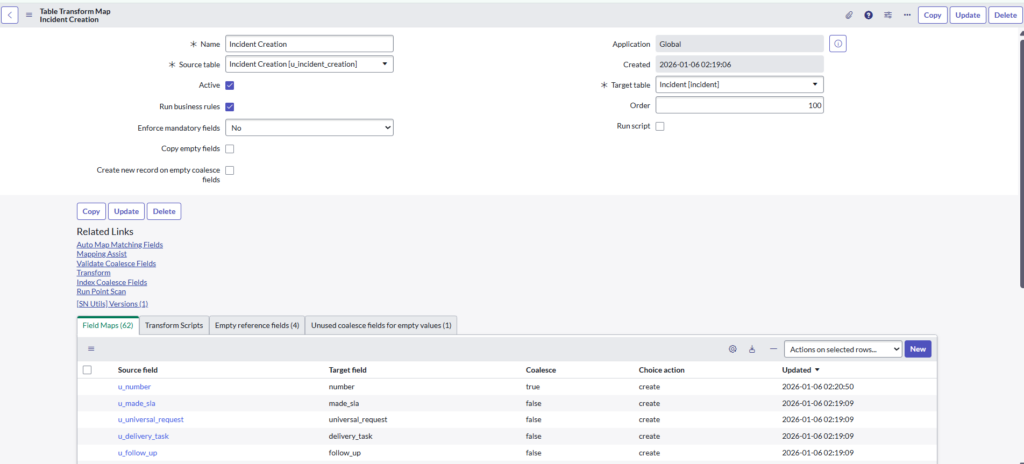
5.1.2 : Transform Map (Core Logic)
Maps data from:
u_incident_creation → incident
Important settings
- Active
- Run business rules
- Enforce mandatory fields (No)
- Coalesce on u_number → number
- Prevents duplicate incidents if number already exists
5.1.3: WSDL (Service Definition)
WSDL URL
https://<TARGET_INSTANCE>.service-now.com/u_incident_creation.do?WSDL
What WSDL contains?
- SOAP operations (insert, update, get, etc.)
- Field definitions
- XML structure expected by ServiceNow
External systems read this WSDL to know:
- What fields to send
- How to format XML
5.2. Create the Outbound SOAP Message (In the Source Instance)
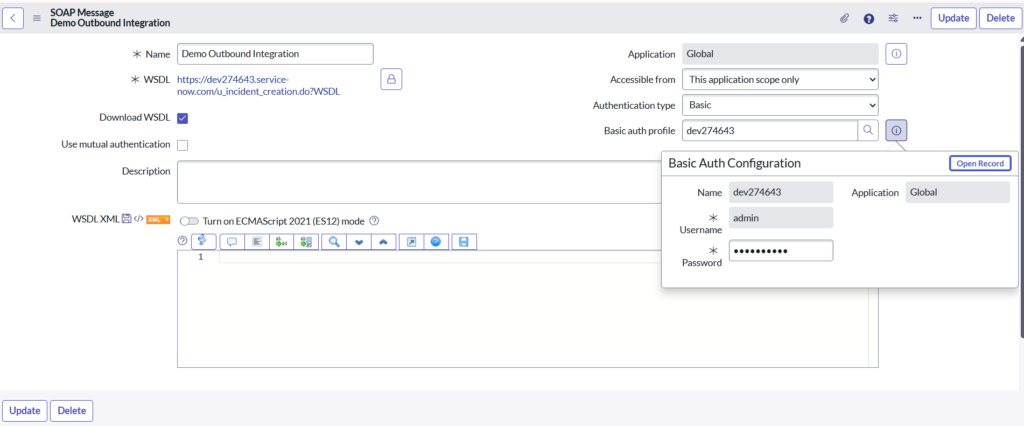
- Navigate to System Web Services > Outbound > SOAP Message.
- Click New and provide a Name (e.g., Target_Incident_Integration).
- Paste the WSDL URL from Step 1 into the WSDL field.
- Authentication: Under the “Authentication” tab, select Basic and provide the credentials of a user in the Target instance (this user must have the itil and soap roles).
- Click Save.
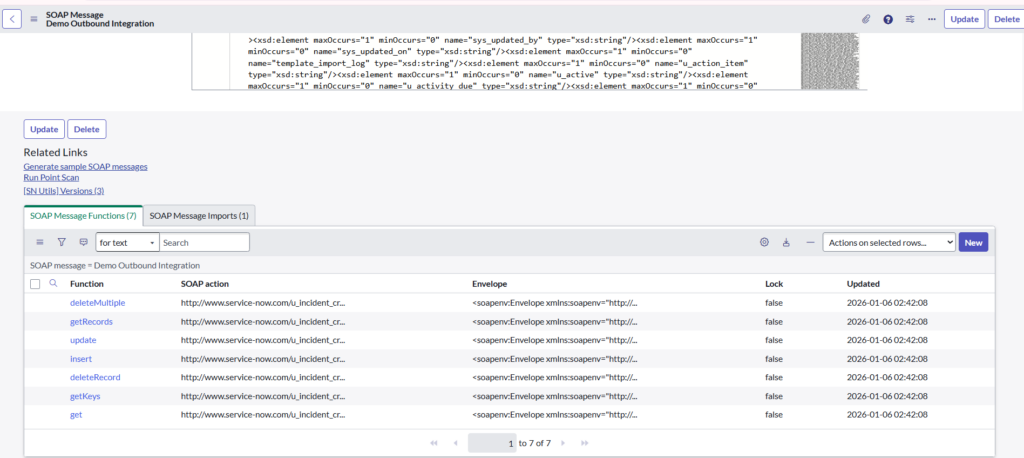
- Once saved, click the Generate sample SOAP messages related link. This will create several functions (insert, update, delete, etc.) under the SOAP Message record.
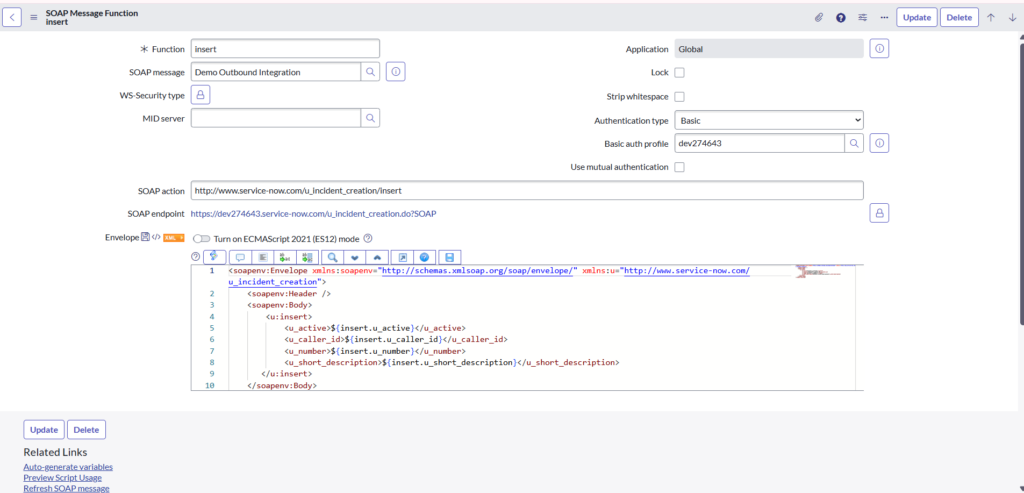
5.2.1. Configure the “insert” Function
- Open the insert function created in the previous step.
- In the SOAP Message field, you will see an XML payload. Look for fields like <short_description>?</short_description>.
- Replace the question marks with variables like ${short_description}. This allows you to pass data dynamically from the Source incident.
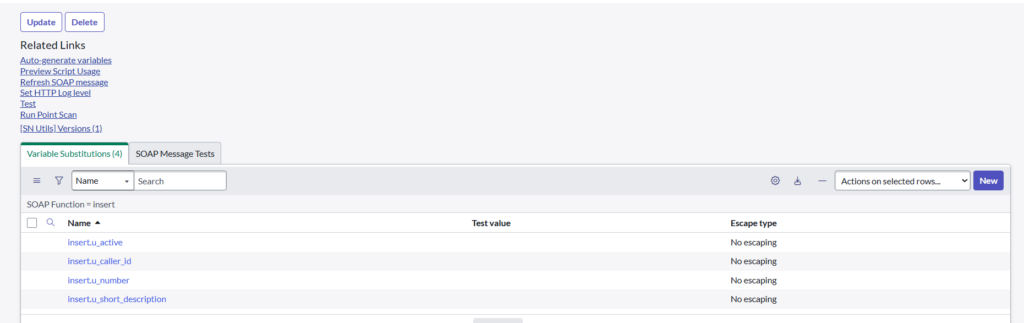
- Click on “Auto Generate Variables” to create variables in variable specification.
Tip: You only need to include the tags for the fields you want to sync (e.g., short_description, description, caller_id).
5.3. Create the Business Rule (In the Source Instance)
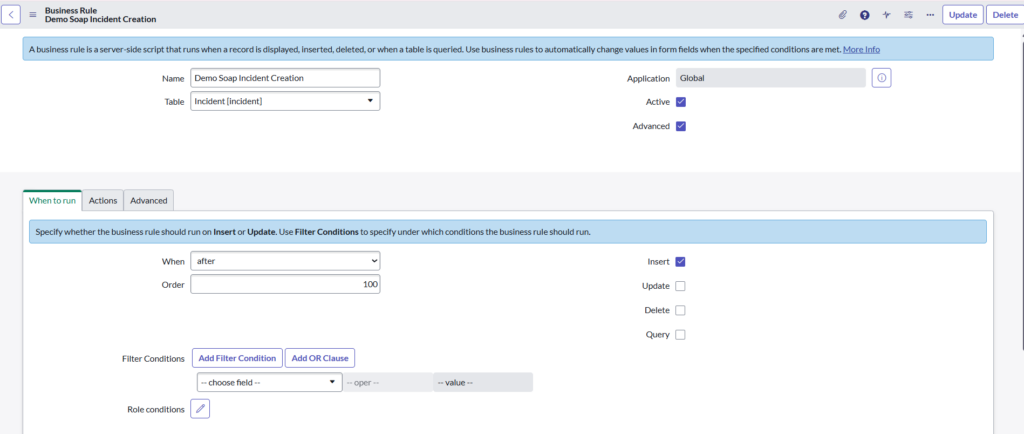
- Navigate to System Definition > Business Rules and click New.
- Table: Incident
- When: after
- Insert: Checked
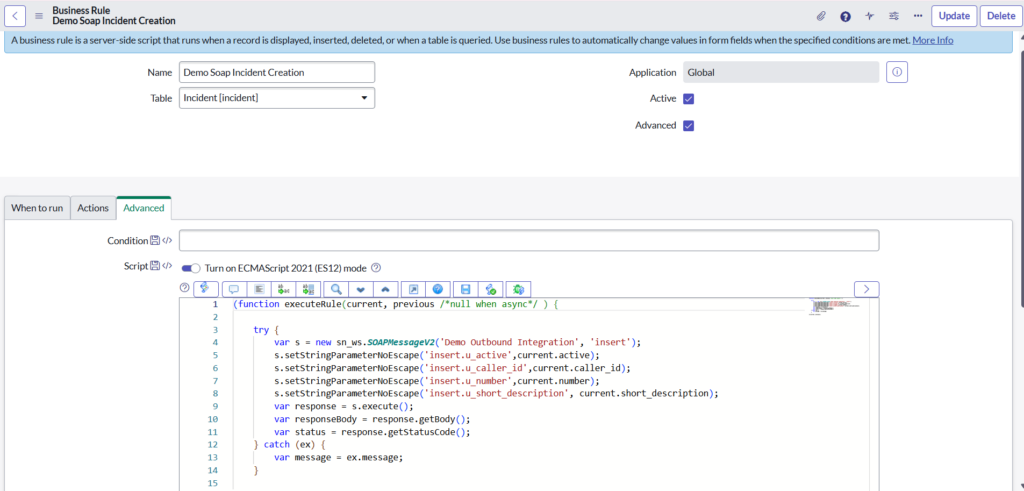
5.3.1. Initializing the SOAP Message
var s = new sn_ws.SOAPMessageV2(‘Demo Outbound Integration’, ‘insert’);
- This line creates an instance of the SOAPMessageV2 API.
- It looks for the Outbound SOAP Message record named ‘Demo Outbound Integration’.
- It specifically targets the insert function you generated earlier.
5.3.2. Passing Dynamic Data (Mapping)
s.setStringParameterNoEscape(‘insert.u_active’, current.active);
s.setStringParameterNoEscape(‘insert.u_caller_id’, current.caller_id);
s.setStringParameterNoEscape(‘insert.u_number’, current.number);
s.setStringParameterNoEscape(‘insert.u_short_description’, current.short_description);
- setStringParameterNoEscape: This function takes the data from your current record and plugs it into the XML variables you defined in your SOAP Envelope.
- current.field_name: This refers to the data in the Incident you just saved in the Source instance.
- insert.u_field_name: These are the variable names (the “Name” column in your last screenshot) that correspond to the fields on your Target’s staging table.
5.3.3 Execution and Response
var response = s.execute();
var responseBody = response.getBody();
var status = response.getStatusCode();
gs.addInfoMessage(‘Record Inserted’);
- s.execute(): This is the “send” button. It physically sends the XML packet over the internet to the Target instance.
- getStatusCode(): This captures the HTTP result. A 200 or 201 usually means success, while 401 or 500 indicates an error.
- gs.addInfoMessage: This displays a blue banner at the top of your screen in ServiceNow to let the user know the integration script ran.
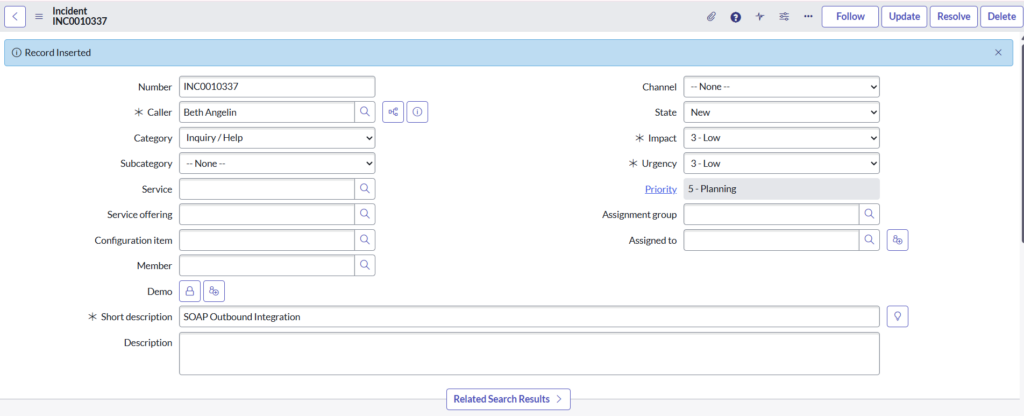
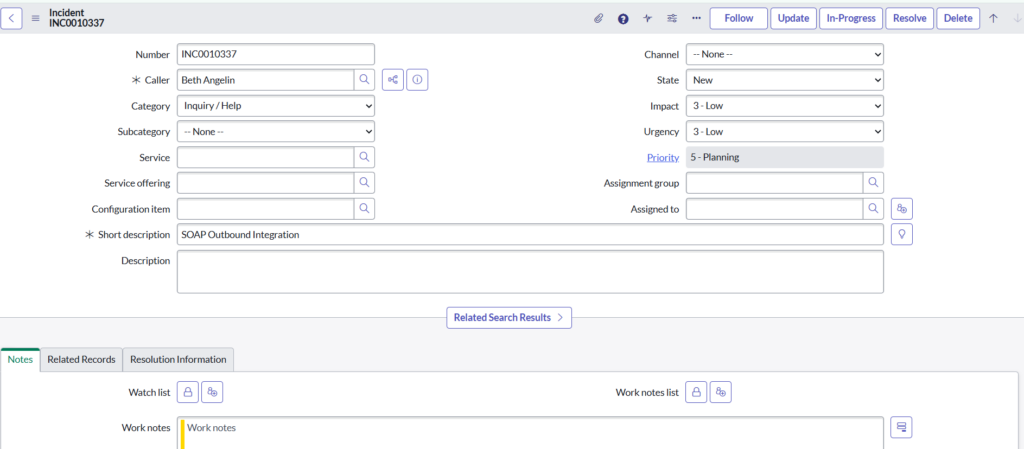
5.4. Incident Creation (Source Instance)
What happens here:
- User creates Incident:
- Caller: Beth Angelin
- Short description: SOAP Outbound Integration
- Business Rule triggers
- SOAP Message executes automatically
5.5. Incident Created in Target Instance
Final Result:
- Target instance receives SOAP call
- Incident is created
- Data matches source incident
- Integration works successfully